To send a fax online, open QuickFax in your browser. Upload your document, enter the recipient's fax number, and pay $1.50/page to send. No account or subscription is required; live status tracking and email confirmation are included. Setup takes about 60 seconds.
How-to Guide
How to Fax Online
Done right, sending a fax online takes about 60 seconds. Here's everything you need to know — without the subscription traps.
No account to set up. No subscription to pay.
Quick Answer
In This Guide
- 01What Online Faxing Is and How It Works
- 02The Fastest Way: Fax Online With No Account
- 03Subscription vs. Pay-Per-Fax
- 04Free Fax Services: What They Don't Tell You
- 05Faxing From Your Phone
- 06What File Types Can You Fax
- 07How to Know Your Fax Was Delivered
- 08Common Mistakes to Avoid
- 09Alternatives to Online Faxing
- 10Frequently Asked Questions
The Basics
What Online Faxing Is (And How It Works)
Online faxing — also called internet fax, e-fax, or virtual fax — lets you send documents to any fax number using the internet instead of a physical fax machine and phone line. The terms are all interchangeable; they describe the same thing.
You upload a document (PDF, Word doc, or photo), the service converts it into the format a fax machine understands and transmits it over the internet, and the recipient receives it on their physical fax machine — or digitally if they use an online service too.
The recipient doesn't need any special equipment or software.
What does vary dramatically across services is what they require you to do before sending: some let you fax online without an account, while others make you sign up, pick a plan, verify your email, and enter payment details before you can send your first page.
Step-by-Step
The Fastest Way: Fax Online With No Account
If you need to send a fax right now without creating an account or subscribing to anything, QuickFax is built exactly for that. The entire process takes about 60 seconds.
- 1Go to QuickFax.com
Open QuickFax.com on your phone or computer. It works in any browser, with nothing to download or install.

- 2Enter the fax number and upload your documents
Type the recipient's fax number with its area code. Then upload or drag and drop your documents: PDFs, Word files or images. They're sent in the order you add them, with an optional cover sheet first.
- 3Pay and send your fax
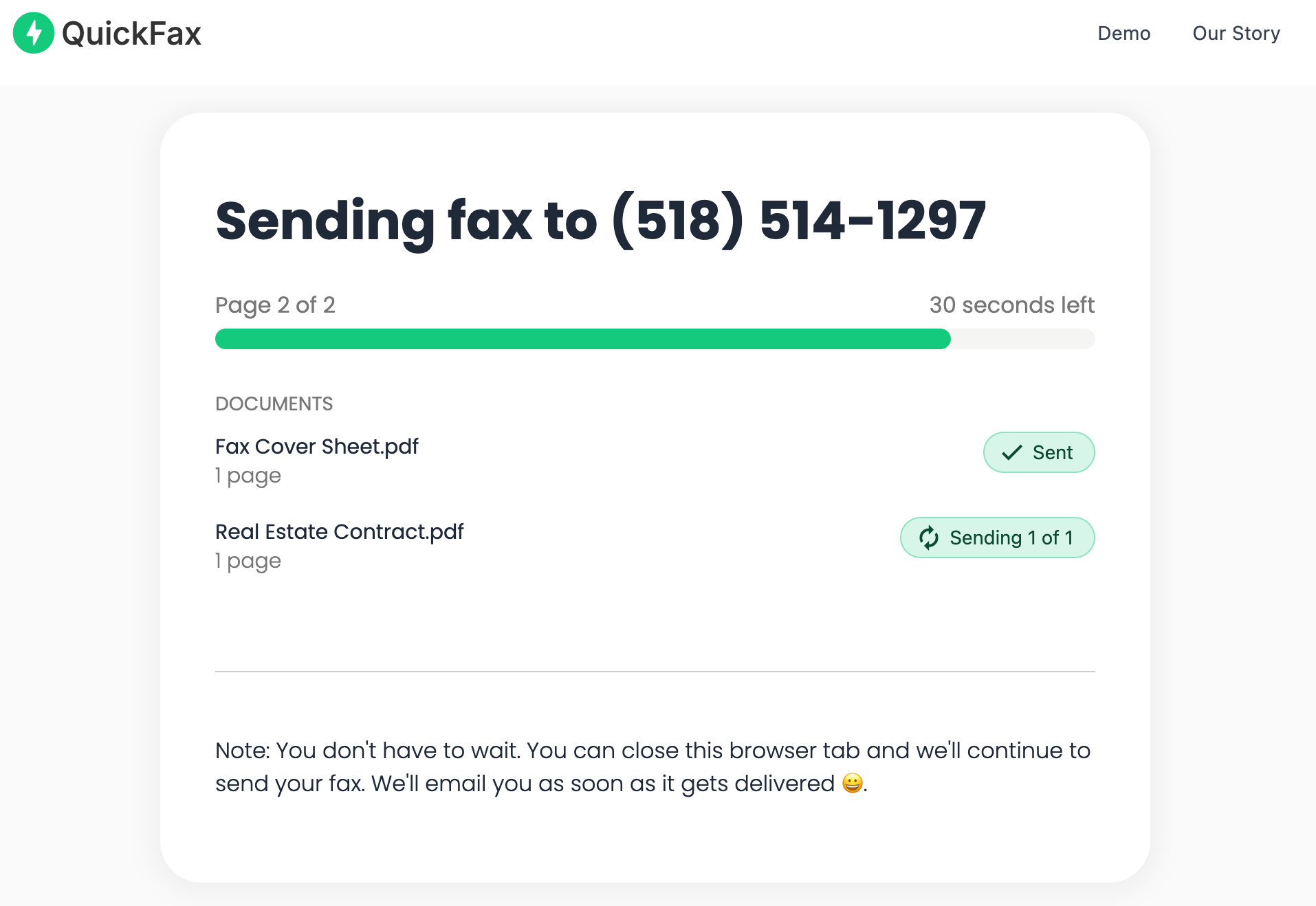
Check the page count and the total price, then pay securely at checkout. You're only charged if the fax is delivered. You can watch it send, or just wait for the confirmation email.
Security is built in, not bolted on
Your files are encrypted with 256-bit AES immediately on upload and automatically deleted from QuickFax's servers once the fax delivers or fails. Your sensitive documents don't sit on a server indefinitely — no settings to configure.
This approach works for the most common faxing situations — sending tax documents to the IRS, forms to Social Security, legal paperwork to courts, records to insurance companies, school enrollment forms — where you need it done now and likely won't fax again for months.
Ready to send? It takes about 60 seconds.
No account · No subscription · $1.50/page.Pricing
Subscription Services vs. Pay-Per-Fax: Which Do You Need?
Most online fax services use a subscription model — you pay monthly ($10–$30+), get a dedicated fax number, and can send and receive high volumes. Services like eFax, MyFax, and Dropbox Fax offer these plans.
QuickFax — 3 faxes / year
$4.50
Pay only when you fax. No subscription to cancel.
vs
Subscription — same usage
$240+
$20/month whether you fax or not. Every year.
A common scenario: someone signs up for a “free trial” to send one urgent fax, forgets to cancel, and ends up paying $240/year for a service they used once. Many subscription services use deliberately confusing cancellation flows — requiring a phone call during business hours, burying the cancel button, or charging a fee to terminate early.
Free Services
Free Fax Services: What They Don't Tell You
Several websites advertise free online faxing. The catches are usually significant: ads on your cover page, page limits (typically 2–5 pages), and reliability issues. Subscription “free trials” require a credit card upfront and auto-convert to paid plans.
The real risk of free fax services for important documents
Free services generate revenue by selling your attention (ads) — not by ensuring your fax delivers. Discovering days later that your IRS submission or court filing never arrived can have real legal and financial consequences. For a document important enough to fax, the reliability of a paid service is worth $1.50/page.
Mobile
Faxing From Your Phone (iPhone & Android)
You can fax from your phone in the same amount of time it takes on a computer. QuickFax is fully mobile-optimized — open it in Safari (iPhone) or Chrome (Android) and the entire process works on your phone's screen without pinching, zooming, or downloading anything.
You can pull documents from your camera roll, files app, email attachments, Google Drive, Dropbox, OneDrive, or your phone's camera — take a photo of a physical paper document and upload the image directly.
No app download needed
Subscription fax services require you to download an app, create an account, and pick a plan before sending anything. QuickFax works from your mobile browser. This matters when you're already stressed about a deadline and don't have time to go through 10 minutes of app setup.
File Types
What File Types Can You Fax Online?
You don't need to convert your document to a special format. QuickFax accepts all standard file types: PDF (recommended — preserves formatting), Word documents (.doc, .docx), images (.jpg, .png, .tiff, .heic), with files up to 20MB.
PDF is the best format when you have a choice — it preserves text, signatures, and page layout exactly as you see it. But if you have a photo of a paper document from your phone, upload the photo directly — a clear, well-lit phone photo faxes perfectly fine. No need to convert it first.
Confirmation
How to Know Your Fax Was Actually Delivered
For time-sensitive documents — IRS tax forms, court filings, insurance claims, medical authorizations — “I think it went through” isn't good enough. You need actual confirmation.
With QuickFax, after you pay you're immediately taken to a live status page showing your fax progress in real time — you can see when it connects, when transmission starts, and when it completes. You'll also receive an email confirmation you can keep as a permanent record — useful if you ever need to prove timely filing for a court deadline or IRS submission.
No charge for failed faxes with QuickFax
If your fax fails (recipient's machine is off, line is busy, number is disconnected), QuickFax emails you and you aren't charged — rather than leaving you to discover the problem days later.
Pitfalls
Common Mistakes to Avoid When Faxing Online
●
Wrong fax number formatUse the full number including area code — no dashes, parentheses, or spaces. One wrong digit sends your document to the wrong place with no warning.
●
Not verifying the number before sendingFor documents going to a government agency, court, or insurance company, confirm the fax number on the organization's official website — not just a third-party listing.
●
Using a free service for important documentsSending an IRS tax form through a free service and assuming it arrived can result in penalties if it failed silently.
●
Forgetting to cancel a free trialMany services auto-charge without a warning email, and cancellation can require a phone call. Set a calendar reminder before the billing date.
●
Not keeping your delivery confirmationFor legal, tax, or any time-sensitive fax, save the delivery confirmation as proof of timely filing.
Alternatives
Alternatives to Online Faxing
Before going through any faxing process, it's worth asking your recipient whether they accept alternatives — many organizations are quietly moving away from requiring faxes. Email a scanned PDF if accepted, visit a retail store fax machine (Office Depot, Staples, UPS Store), use library fax services, or check for online portal uploads on the recipient's website.
For urgent, time-sensitive faxing when you need a documented paper trail — faxing online through QuickFax remains the fastest option available 24/7 from any device.
Kind Words from QuickFax Customers
“Fast, secure, the price is right! This site is a blessing for those who rarely have to send a fax.”
Stephen from California
“By far the easiest and most convenient internet fax service I have ever used. Highly recommend.”
John from New Mexico
“I loved that it doesn't require a subscription or a free trial. I just got in and faxed what I needed to.”
Tom from Mississippi
“This was my first time sending a fax this way, and it was very easy. I will definitely use this again. Was much easier then going to a store.”
Elizabeth from Arizona
Trusted by thousands to fax IRS, SSA, legal, medical, government documents, and more.
Send a Fax Online →No subscription. $1.50/page.
Common Questions
Frequently Asked Questions
Do I need a fax number to send a fax online?
No. You only need the recipient's fax number. To send a fax with QuickFax you don't need your own fax number — you're just sending outbound. A dedicated number is only needed if you also want to receive faxes.
Can I fax online to a regular fax machine?
Yes. Online fax services transmit to traditional fax machines — the recipient doesn't need any special software.
How long does it take for an online fax to send?
Most online faxes transmit within 1–3 minutes per page depending on the recipient's connection quality. QuickFax's live status page shows progress in real time.
Is online faxing legally valid for official documents?
Yes. Online faxes have the same legal validity as machine-sent faxes for tax documents, court filings, contracts, and other official uses. The IRS, courts, and government agencies treat internet faxes the same as traditional ones.
What if my fax fails to send?
QuickFax emails you if the fax fails, and you aren't charged. You can then retry, verify the number, or contact the recipient to check their fax machine.
Ready to Send Your Fax?
Just enter the fax number, upload your documents, and send.
Send a Fax Online → No account needed No subscription Pay per page