Can You Fax at Office Depot? (2026 Answer + Best Alternative)
Yes — Office Depot offers self-service faxing at many locations through its in-store print and copy kiosks. But not every store has the service, the per-page rates are among the highest in retail, and a 5-page fax will run you over $10. Here's the full picture before you make the trip.
No account to setup. No subscription to pay.
Office Depot's store locator includes a specific “Faxing Services” filter. Use the locator filter or call your branch before driving over.
Both brands operate under ODP Corporation and share the same in-store print and copy setup. If you've used an OfficeMax for faxing before, the experience at an Office Depot location (and vice versa) will be essentially identical — same self-service kiosks, same workflow.
Office Depot promotes sending faxes but does not publish a nationwide policy for receiving or holding incoming faxes for pickup. If you need to receive a fax, call your specific location to confirm before having a document sent there.
Office Depot Fax Pricing: The Real Numbers
Office Depot's website markets “Faxing Starting at $0.99” — but that headline figure doesn't reflect what most people pay for a typical domestic or international fax. Here's the full pricing breakdown, and what a 5-page fax actually costs.
| Fax Type | First Page | Additional Pages | 5-Page Total |
|---|---|---|---|
| Local (same area code) | $1.99 | $1.79/page | $9.15 |
| Domestic (long distance) | $2.29 | $2.09/page | $10.65 |
| International | $7.99 | $3.99/page | $23.95 |
| QuickFax (online) — local/domestic | $1.50 | $1.50/page | $7.50 |
Office Depot pricing based on community-reported figures and SERP analysis as of April 2026. Prices may vary by location — confirm with your local store. No rewards discounts apply to fax services.
How to Send a Fax at Office Depot
Office Depot's self-service model is one of the more straightforward in retail — no staff assistance required, and you pay at the kiosk or register. Here's what to expect from start to finish.
Go to officedepot.com/storelocator and use the “Faxing Services” filter. Not every location has it. Once you've identified a candidate store, call ahead to confirm the machine is working and ask about current pricing.
Office Depot's self-service kiosks require paper — you cannot walk up and fax from your phone, email, or cloud storage. If your document only exists digitally, print it first (either at home or at the in-store print station for an added cost).
The fax capability is built into the Xerox self-service kiosks in the print center section of the store — not a dedicated fax machine. Look for the copier/printer stations, usually near the back or side of the store.
Follow the on-screen prompts. You'll enter the full fax number (including area code for domestic, country code for international). Double-check the number before proceeding — a misdialed fax is gone and you'll pay for a resend.
Place your pages in the document feeder. The machine will transmit and display a status screen. Wait for a confirmation that the fax sent successfully before removing your originals.
Payment is typically handled at the kiosk or at the service desk — ask a team member if it's not clear. Request a printed confirmation page showing the fax number dialed, page count, date/time, and transmission status. This is your proof of delivery.
What Office Depot Faxing Really Costs (Beyond the Per-Page Rate)
The per-page rate is the price you see. The total cost of the experience includes a few things the kiosk screen doesn't show you.
A round trip to Office Depot averages 20–45 minutes for most people — before the fax itself. Factor in gas, potential parking, and the opportunity cost of your time. A $2.29 fax can easily cost you an hour of your day.
Self-service kiosks are shared equipment. They run out of paper, go offline, or malfunction without notice. If the machine is down when you arrive, you've made the trip for nothing. Office Depot's FAQ does not publish uptime guarantees.
If your document only exists on your phone or computer, you'll need to print it first — either at home or at Office Depot's print center (typically $0.12–$0.20/page for black-and-white). That's an extra cost and step on top of the fax rate.
Office Depot's rewards program does not apply to fax services. What you see on the price sheet is what you pay — there's no coupon, no member discount, and no way to offset the per-page cost.
Office Depot stores typically close by 8–9 PM on weekdays and earlier on weekends. If you need to fax a deadline document in the evening, after a holiday, or on a Sunday afternoon, you may be out of options before you walk in the door.
Like all in-store fax machines, Office Depot's kiosks are shared public equipment. For sensitive documents — tax forms, medical records, legal filings — there's no encryption, no auto-deletion, and no audit trail beyond the printed confirmation sheet.
Office Depot vs. QuickFax: Full Comparison
| Feature | Office Depot | QuickFax |
|---|---|---|
| Availability | Store hours only (typically closes 8–9 PM) | 24/7 — any time, any day ✓ |
| Where you send from | Must go to a store in person | From your computer or phone, anywhere ✓ |
| Local fax (per page) | ~$1.99 first page / $1.79 additional | $1.50 ✓ |
| Domestic fax (per page) | ~$2.29 first page / $2.09 additional | $1.50 ✓ |
| International fax (per page) | $7.99 first page / $3.99 additional | Not available |
| 5-page domestic fax total | $10.65 | $7.50 ✓ |
| Mobile documents (PDF, photo) | No — paper documents only | Yes — phone camera supported ✓ |
| Receive faxes | Unconfirmed — call branch | Not available |
| Delivery confirmation | Printed receipt at kiosk | Live tracking + email confirmation ✓ |
| Encryption | None — shared public kiosk | 256-bit AES + auto-delete ✓ |
| Account required | No | No — pay per fax ✓ |
| Travel required | Yes — must go to store | No — send from anywhere ✓ |
Office Depot vs. Other Physical Fax Locations
If you've decided a physical store visit is necessary, it's worth knowing how Office Depot's pricing and experience stack up against other retail options.
| Location | Model | First Page (domestic) | Notable |
|---|---|---|---|
| Office Depot / OfficeMax | Self-service kiosk | ~$2.29 | 1,000+ US locations; “Faxing Services” filter in locator |
| Staples | Self-service | ~$2.39 | Printed confirmation included; pricing not posted nationally |
| FedEx Office | Self-service copier station | ~$2.49 example | Prices vary by store; call ahead; not available at all FedEx |
| The UPS Store | Staff-assisted | $2.00–$3.00+ | 5,500+ US locations; franchise pricing varies |
| Public Library | Staff-assisted (mostly) | Free–$1.75 | Call to confirm at your branch |
| QuickFax (online) | From your phone, tablet, or computer | $1.50 | No travel · 24/7 · 256-bit encryption · live tracking |
Office Depot's main advantage over competitors is location density and the self-service model (no waiting for staff). Its main disadvantage is price — at $2.29 for a domestic first page, it's at the higher end of the retail faxing market.
When to Use Office Depot vs. QuickFax
Office Depot faxing is a perfectly legitimate option in the right circumstances. Here's an honest framework for deciding which makes sense for your situation.
🏪Choose Office Depot if…
- →You're already at Office Depot for another errand
- →You prefer to pay in cash and need an in-person transaction
- →You have no smartphone or internet access
- →You're sending a single page and the trip is nearby
- →You need to print and fax in one stop
✅Use QuickFax if…
- →Your document exists digitally (PDF, photo, email attachment)
- →You're faxing 2+ pages — the savings add up fast
- →You need to send outside store hours (evenings, weekends, holidays)
- →You need to receive a fax as well as send one
- →The document is sensitive and you want encryption
- →You're on a deadline and can't risk a broken machine
Need to send a fax right now?
No account. No subscription. $1.50/page. Live delivery confirmation.How to Send a Fax Online (in 3 Steps)
With QuickFax you can fax without a fax machine. You don't need to download an app. You don't need to create an account. Here's how QuickFax works.
- 1Go to QuickFax.com on your phone or computer
No app to install. Open the page in any browser — works on iPhone, Android, or desktop.

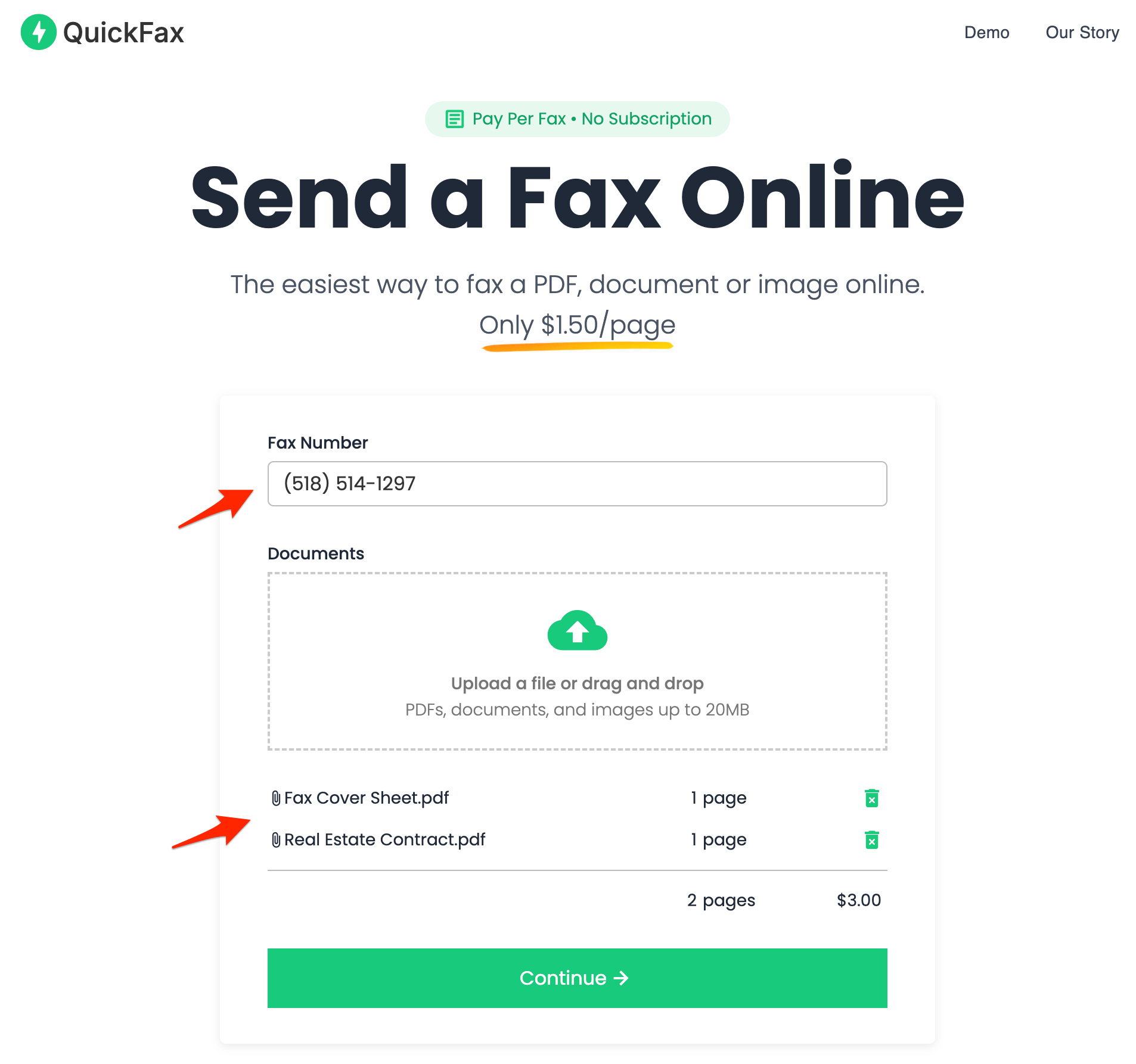
- 2Enter the fax number and upload your documents
You can fax PDFs, Word files (DOC, DOCX), JPG, PNG, and HEIC — including photos taken directly with your phone camera. No conversion needed.
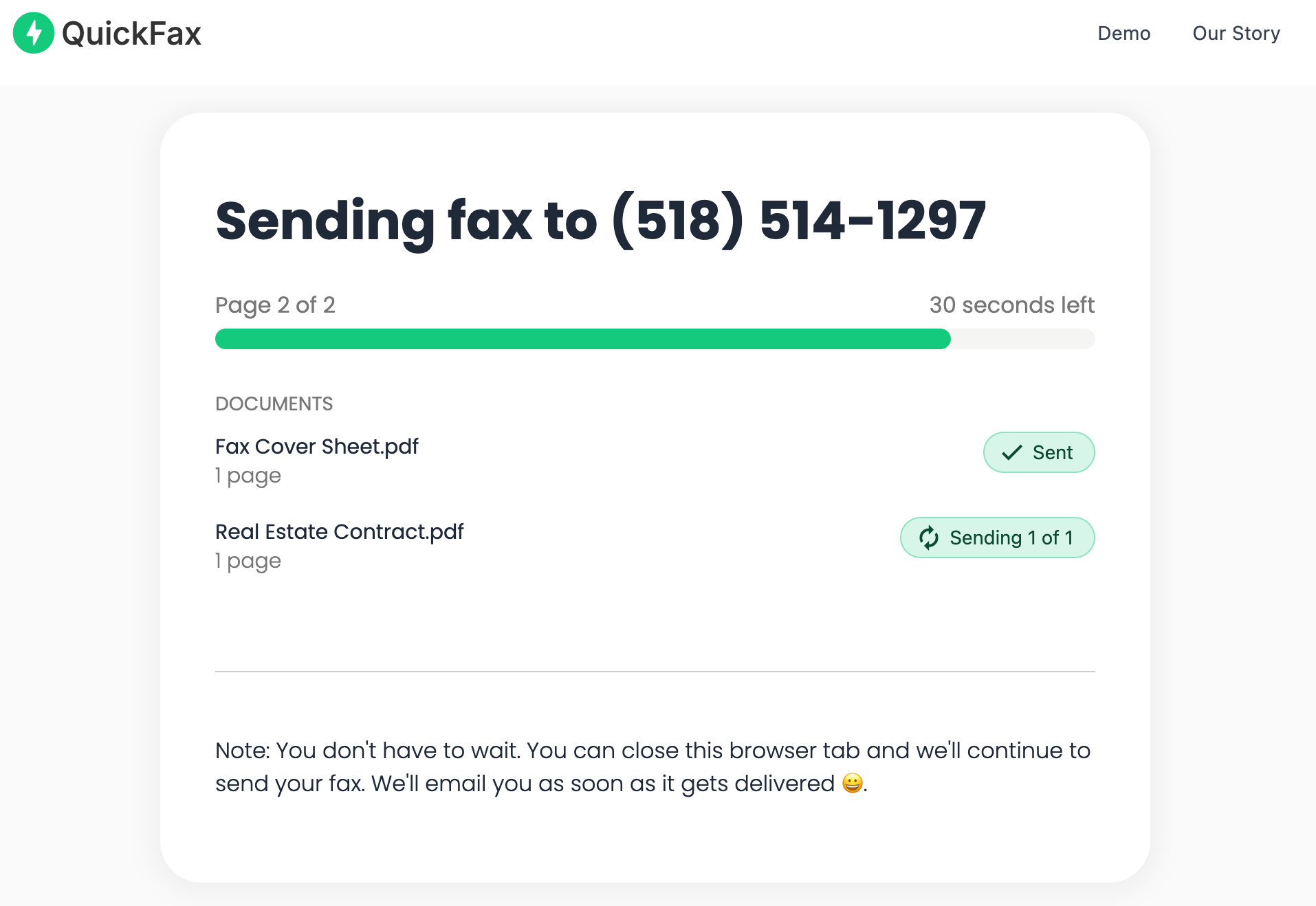
- 3Send your fax and watch it get delivered
Track delivery in real time. Once the fax is received, you get an email confirmation. Your files are then automatically deleted from QuickFax's servers.
Need to send a fax right now?
No account to setup. No subscription to pay. $1.50/page.Why Online Faxing Is More Secure Than a Store Fax Machine
Public fax machines in stores aren't exactly known for privacy. Your documents pass through shared equipment, other customers may be nearby, and there's no reliable way to know your data was handled securely.
QuickFax encrypts your files immediately upon upload using 256-bit AES encryption, with TLS 1.2 enforced throughout. Your documents are automatically deleted after successful delivery — or after a failed send attempt. So your fax stays private.
Kind Words from QuickFax Customers
“Fast, secure, the price is right! This site is a blessing for those who rarely have to send a fax.”
Stephen from California
“By far the easiest and most convenient internet fax service I have ever used. Highly recommend.”
John from New Mexico
“I loved that it doesn't require a subscription or a free trial. I just got in and faxed what I needed to.”
Tom from Mississippi
“This was my first time sending a fax this way, and it was very easy. I will definitely use this again. Was much easier then going to a store.”
Elizabeth from Arizona
Trusted by thousands to fax IRS, SSA, legal, medical, government documents, and more.
Send a Fax Online →No subscription. $1.50/page.
Office Depot Fax Services — Common Questions
Can you fax at Office Depot?
Yes — Office Depot offers self-service faxing at many locations through in-store print and copy kiosks. You can send local, domestic, and international faxes. However, not every location has faxing capability — use the Office Depot store locator's “Faxing Services” filter or call your branch before making the trip.
How much does it cost to fax at Office Depot?
Office Depot charges approximately $1.99 for the first page of a local fax ($1.79 each additional), $2.29 for domestic long-distance ($2.09 additional), and $7.99 for international ($3.99 additional). A 5-page domestic fax totals around $10.65. Office Depot's website advertises “Faxing Starting at $0.99” as a headline — this likely reflects a lower per-additional-page tier, not the first-page cost. Call your store to confirm exact pricing.
How do I send a fax at Office Depot?
Find a location with the “Faxing Services” filter on the store locator, then call ahead to confirm availability. Bring your printed documents to the self-service print center, select “Fax” on the Xerox kiosk, enter the recipient's number, feed your documents, wait for transmission confirmation, and pay at the kiosk or service desk. Ask for a printed confirmation page showing successful transmission.
Does Office Depot receive faxes?
Office Depot does not clearly document a universal policy for receiving or holding inbound faxes for patron pickup. This is in contrast to some UPS Store locations, which do offer inbound faxing. Call your specific Office Depot location directly to ask before having a document faxed there.
Does OfficeMax also offer fax services?
Yes — OfficeMax locations use the same self-service print kiosk setup as Office Depot (both are owned by ODP Corporation). The experience is essentially identical between the two brands.
Can I fax from my phone at Office Depot?
No — Office Depot's self-service kiosks require physical paper documents. If your document is on your phone (PDF, photo, email attachment), you'll need to print it first before faxing. QuickFax accepts digital files directly — including photos taken with your phone's camera — with no printing step required.
Is Office Depot cheaper than online fax services?
Generally no. For a domestic fax, Office Depot charges approximately $2.29 for the first page vs. QuickFax's $1.50 per page. A 5-page domestic fax at Office Depot totals about $10.65; via QuickFax it's $7.50. The only scenario where Office Depot might be comparable is a single local fax where you're already in the store.
Ready to Send Your Fax?
Just enter the fax number, upload your documents, and send.
Send a Fax Online →