To fax a document online, open QuickFax in your browser. Upload your document, enter the recipient's fax number, and pay $1.50/page to send. No account, subscription, or app is required; live status tracking and email confirmation are included. Setup takes about 60 seconds.
How-to Guide
How to Fax a Document
4 methods explained — from the fastest online option to physical fax machines. Find the right one for your situation.
No account to set up. No subscription to pay.
Quick Answer
In This Guide
- 01Why faxing still exists in 2026
- 02Your 4 options at a glance
- 03The easiest way: fax online with QuickFax
- 04How to fax from your phone or tablet
- 05Faxing from email (requires subscription)
- 06Using a physical fax machine
- 07Faxing at Office Depot, Staples & UPS Store
- 08Subscription services vs. pay-per-fax
- 09Tips for a successful fax
- 10Common questions answered
Background
Why Faxing Still Exists in 2026
If you're wondering why you still need to fax anything in 2026, you're not alone. The answer comes down to legal compliance and security standards — many government agencies, healthcare providers, courts, and financial institutions require faxing because it provides a legally recognized, point-to-point transmission record that email doesn't.
IRS, SSA, courts, and government agencies
Hospitals, doctors, and insurance companies (HIPAA)
Legal offices, courts, and attorneys
Banks, mortgage lenders, and financial institutions
The good news: you don't need a physical fax machine anymore. Modern online fax services let you send a fax from any device — phone, tablet, or computer — in minutes.
Compare
Your 4 Options at a Glance
Online pay-per-fax
Best for mostUpload to a website, pay per page ($1.50–$2), send. No account, no subscription. Works from any device. QuickFax is the fastest option for one-time or occasional faxing.
Subscription service
High-volume use$10–$30/month for a dedicated fax number and outbound faxing. Worth it only if you fax more than 15 times per month or need to receive faxes regularly.
Retail store fax machine
If nearbyOffice Depot, Staples, UPS Store. Similar per-page pricing ($1.50–$2.50) but requires driving there, waiting in line, and operating within store hours.
Physical fax machine
Rarely worth itRequires a fax machine ($100–$500+) and a dedicated landline ($20–$40/month). Only makes sense for offices that fax constantly and already have the infrastructure.
Step-by-Step
The Easiest Way: Fax a Document Online with QuickFax
QuickFax is built specifically for people who need to send a fax online without creating an account, subscribing to a monthly plan, or navigating complex software. You just upload, enter a number, and send.
- 1Go to QuickFax.com
Open QuickFax.com on your phone or computer. It works in any browser, with nothing to download or install.

- 2Enter the fax number and upload your documents
Type the recipient's fax number with its area code. Then upload or drag and drop your documents: PDFs, Word files or images. They're sent in the order you add them, with an optional cover sheet first.
- 3Pay and send your fax
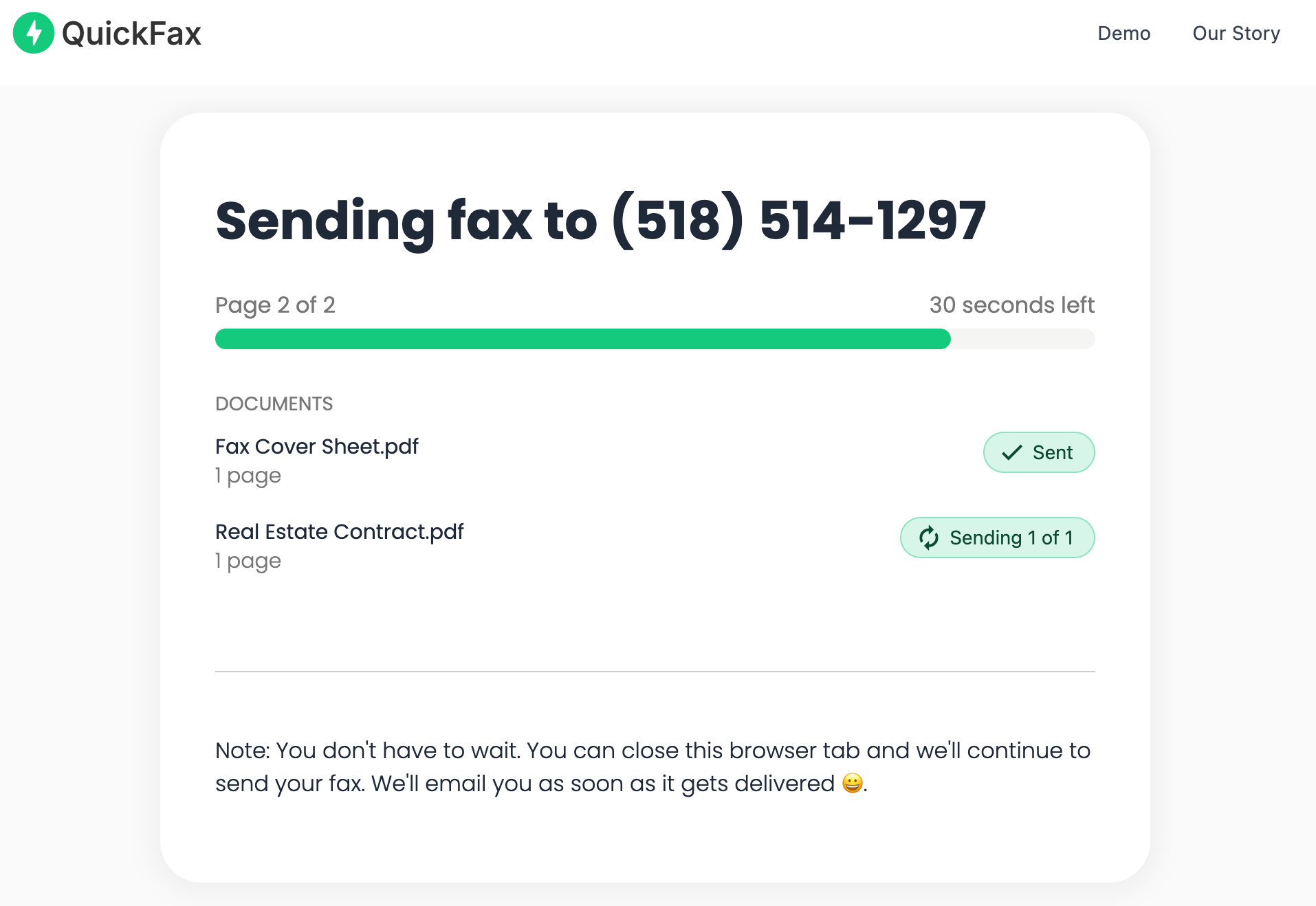
Check the page count and the total price, then pay securely at checkout. You're only charged if the fax is delivered. You can watch it send, or just wait for the confirmation email.
Your files are protected and automatically deleted
Documents are encrypted with 256-bit AES immediately on upload and deleted from QuickFax's servers once the fax is delivered or fails. Your sensitive information doesn't sit on a server indefinitely.
Ready to send? It takes about 60 seconds.
No account · No subscription · $1.50/page.Mobile
How to Fax from Your Phone or Tablet
You don't need a computer to fax a document. QuickFax is fully optimized for mobile — open it in Safari (iPhone) or Chrome (Android), and the entire process works the same as on desktop.
On mobile, you can upload documents from your device storage, camera roll, email attachments, or cloud apps like Google Drive and Dropbox. You can also take a photo of a physical paper document with your camera and upload the photo directly — QuickFax accepts .jpg and .heic files, so a clear phone photo faxes just fine.
No app download required
Many subscription fax services require you to download an app and create an account before sending anything. QuickFax works directly in your mobile browser — no downloads or signups. Particularly useful for urgent situations when you need to send a fax right now from wherever you are.
Mobile faxing is especially valuable when you're away from the office, working remotely, or facing a same-day deadline. Instead of rushing to an office supply store that might close at 9pm, you can handle it from your couch or car in about 60 seconds.
Email-to-Fax
Faxing from Email (Requires Subscription)
Some online fax services let you send a fax from email by composing a message with your document attached and sending it to a special address (like recipientnumber@faxservice.com). The service converts and transmits it as a fax.
Services offering this include eFax, MyFax, and RingCentral — but all require monthly subscriptions ($10–$30/month) before you can use the feature.
Email-to-fax isn't a shortcut for one-time faxing
You still need to create an account and commit to a subscription just to use the email method. If you only need to send one fax, this adds more friction than it removes. Email-to-fax makes sense only if you're already paying for a subscription service and fax regularly.
Traditional
Using a Physical Fax Machine
If you have access to a traditional fax machine and landline phone connection (at your office, a library, or a friend's workplace), here's how the process works:
1
Load your documentPlace it face-down in the document feeder (or face-down on the scanner glass), making sure pages are aligned properly.
2
Dial the recipient's fax numberUse the machine's keypad — include any office prefix (like “9” for an outside line), the area code, and the full number.
3
Press Send or StartLabels vary by model. You'll hear a series of tones — this is normal, it means the machines are handshaking.
4
Keep the confirmation pageIt prints when the fax completes and shows the date, time, recipient number, and number of pages sent.
Physical fax machines require a landline phone connection — they won't work with VoIP phones or cell phones without a special adapter. They also require physical access to the machine, use paper and toner, and tie up a phone line during transmission.
For anyone who doesn't already have easy access to one, faxing a document online through QuickFax is faster, cheaper, and doesn't require any hardware.
In-Store
Faxing at Office Depot, Staples & UPS Store
Retail locations like Office Depot, Staples, and UPS Store offer public fax machines that anyone can use. No account required — bring your document (physical or on a USB drive), pay at the counter, and staff can assist if needed.
Pricing: typically $1.50–$3.00 for the first page, then $2.00–$2.50 per additional page — similar to QuickFax's $1.50/page rate.
The real cost is your time. Factor in the drive (10–15 minutes each way), potential wait time, and being limited to store hours. That's 30–45 minutes for what should be a 2-minute task. If you need to fax something outside business hours, on a weekend, or on a holiday, retail locations won't be an option — QuickFax works 24/7.
Privacy concern with public fax machines
Store fax machines are shared public equipment. Your sensitive documents (medical records, tax forms, legal contracts) pass through a machine used by strangers, with a risk of pages being left in the output tray or seen by staff. QuickFax encrypts your files and deletes them after delivery.
Pricing
Subscription Services vs. Pay-Per-Fax
Subscription-based services like eFax, MyFax, RingCentral, and Dropbox Fax (formerly HelloFax) give you a dedicated fax number and high-volume faxing for $10–$30/month. They make sense for businesses that fax frequently and need to receive inbound faxes — but they're expensive overkill for anyone who faxes occasionally.
QuickFax — 3 faxes/year
$4.50
Pay only when you fax. No subscription to cancel.
vs
Subscription — same usage
$240+
$20/month whether you fax or not. Every year.
A common scenario: you sign up for a “free trial” to send one urgent document, forget to cancel, and end up paying $240/year for a service you used once or twice. Many subscription services use deliberately confusing cancellation flows to make quitting difficult.
| Service | Best for | Account? | Monthly cost | Receive? |
|---|---|---|---|---|
| QuickFax | One-time & occasional faxers | No | $0 — only pay per page | Send only |
| eFax | High-volume business faxers | Yes | From $18.99/mo | Yes |
| MyFax | Regular faxers needing a number | Yes | From $10/mo | Yes |
| RingCentral | Business teams with high volume | Yes | From $22.99/mo | Yes |
| Dropbox Fax | Dropbox users who fax regularly | Yes | From $10/mo | Yes |
The rule of thumb: if you fax fewer than 15 pages per month, pay-per-fax will save you money. If you fax more than that and need to receive faxes, a subscription may be worth the monthly cost.
Don't pay for a subscription you'll barely use.
QuickFax: $1.50/page, no account, no commitment.Best Practices
Tips for Ensuring Your Fax Goes Through Successfully
●
Verify the fax number before sending.A single wrong digit sends your fax to the wrong recipient or fails entirely. For government agencies and medical offices, confirm the number on their official website — not just a third-party listing.
●
Use PDF format when possible.PDFs produce the cleanest fax output compared to photos or image files. If you have a choice between formats, PDF is the safest option for ensuring text and signatures are clearly readable.
●
Scan physical documents carefully.If photographing a paper document with your phone, use good lighting, keep the document flat, and shoot from directly above to avoid perspective distortion.
●
Include a cover page for important documents.For medical, legal, or business faxes, a cover page with your name, the recipient's name, total page count, and a brief description helps route your fax correctly.
●
Fax during business hours when possible.Faxes sent overnight may sit unnoticed or get buried under others. If your document is time-sensitive, send during the recipient's working hours and follow up with a phone call.
●
Keep your delivery confirmation.Save the email confirmation from QuickFax as proof of transmission. If there's ever a question about whether you sent the fax — for court filings, IRS deadlines, medical authorizations — this confirmation is your documentation.
●
Use portrait orientation.Landscape-oriented documents may appear rotated or compressed when received. Convert to portrait if possible before faxing.
●
Follow up for critical documents.For extremely time-sensitive or high-stakes faxes, call the recipient after sending to confirm receipt. Especially important near deadlines for court filings or IRS submissions.
Kind Words from QuickFax Customers
“Fast, secure, the price is right! This site is a blessing for those who rarely have to send a fax.”
Stephen from California
“By far the easiest and most convenient internet fax service I have ever used. Highly recommend.”
John from New Mexico
“I loved that it doesn't require a subscription or a free trial. I just got in and faxed what I needed to.”
Tom from Mississippi
“This was my first time sending a fax this way, and it was very easy. I will definitely use this again. Was much easier then going to a store.”
Elizabeth from Arizona
Trusted by thousands to fax IRS, SSA, legal, medical, government documents, and more.
Send a Fax Online →No subscription. $1.50/page.
Common Questions
Frequently Asked Questions
Do I need a phone line to fax a document?
Only if you're using a traditional fax machine. Online fax services work over your internet connection — fax without a phone line from any device with WiFi or cellular data.
What file format should I use?
PDF is best — it produces the cleanest output and preserves formatting, signatures, and page layout. QuickFax also accepts Word documents (.doc, .docx), and images (.jpg, .png, .tiff, .heic) up to 20MB.
How do I know my fax was delivered?
QuickFax provides a live status page showing real-time transmission progress, plus an email confirmation with date and time of delivery. This serves as proof for IRS submissions, court filings, and medical records where documentation matters.
How long does it take to send a fax?
The upload and setup takes about 60 seconds. Transmission typically takes 1–3 minutes per page.
What if my fax fails to send?
QuickFax emails you if the fax fails, and you aren't charged. You can then retry, verify the number, or contact the recipient to check their fax machine.
Is faxing secure for sensitive documents?
Faxing is considered secure for sensitive documents because it's a direct point-to-point transmission. QuickFax adds 256-bit AES encryption and automatically deletes your files after delivery — more secure than a shared public fax machine where documents can be left in output trays.
Do I need to include a cover page?
Not required, but recommended for medical, legal, or business faxes. A cover page with your name, the recipient's name, total page count, and a brief description helps route your fax and confirm all pages arrived. Some government agencies specify required cover page information.
Can I fax a document without a fax machine?
Yes. Faxing without a fax machine is exactly what online services like QuickFax are built for. No hardware, no phone line, no special equipment — just your internet connection and the document you want to send.
Ready to Send Your Fax?
Just enter the fax number, upload your documents, and send.
Send a Fax Online → No account needed No subscription Pay per page