Faxing Guide

How to Fax Papers: 4 Simple Methods That Actually Work

Whether you have a fax machine, a smartphone, or nothing at all — here's exactly how to get your papers faxed fast.

Send a Fax Online →

No account · No subscription · Instant delivery

⚡ Quick Answer

The fastest way to fax papers online in 2026 is to use QuickFax: upload your document, enter the fax number, and send — no account, no subscription, just $1.50 per page. The entire process takes about 60 seconds.

If you prefer other options: visit The UPS Store, Office Depot, or FedEx Office for in-person faxing, or use a traditional machine if you have one.

Method 1 · Best

Send a Fax Online (No Equipment Needed)

Online fax services let you send a fax from your computer or phone without needing a fax machine or landline. Perfect if you just need to fax a document once and don't want to buy equipment or drive somewhere.

The process is simple: upload your document (PDF, photo, Word file), enter the recipient's fax number, and the service sends it electronically to their fax machine.

  1. 1
    Go to QuickFax.com

    No account creation or sign-up required — just open the site in any browser on your computer or phone.QuickFax.com homepage in a browser

  2. 2
    Upload your papers and enter the fax number

    PDF, Word doc, JPG, PNG — or take a photo of physical documents with your phone. Then type the full fax number including area code.QuickFax upload papers interface

  3. 3
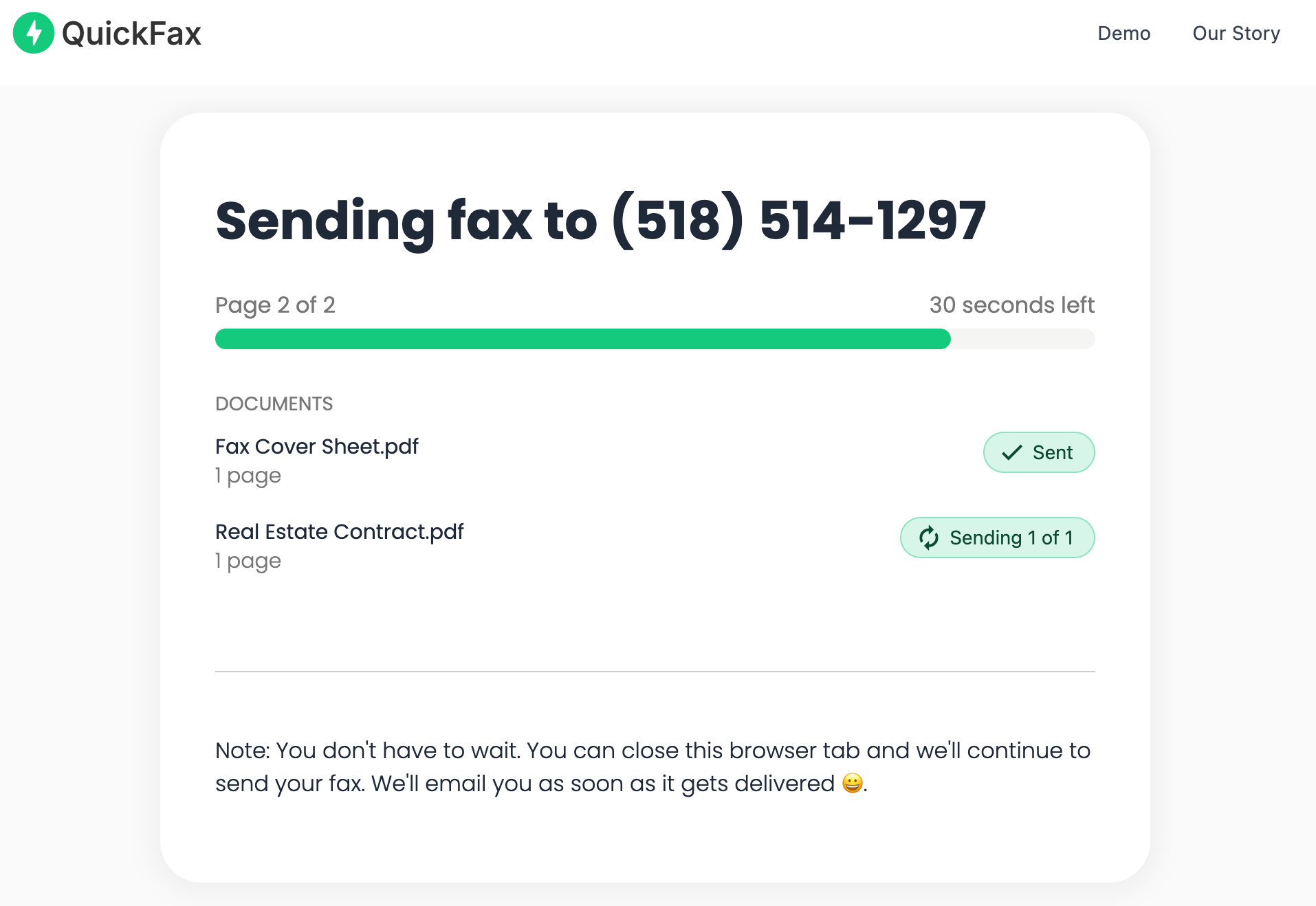
    Pay $1.50/page and watch it send in real time

    No subscription, no hidden fees — you only pay for what you send. Live status updates show “Sending” → “Delivered” plus an email confirmation.QuickFax live fax sending status page

✓ Works from anywhere with internet

Your couch, your car, a coffee shop — as long as you have a connection, you can send a fax online. The whole process takes about 60 seconds.

Ready to fax your papers right now?

No account, no subscription — just upload and send in 60 seconds.
Send a Fax Online →
Method 2

Use a Traditional Fax Machine

If you already have a fax machine and landline, this works — but buying one just to fax papers rarely makes sense financially.

Setup requirements: Load documents into the automatic document feeder (face-up) or place single pages on the scanner glass (face-down). Connect a two-wire telephone cord to the port labeled ‘1-LINE’. Set up your fax header with your name and fax number, then configure auto-answer settings.

To send: Load your document, dial the complete fax number including area code, press ‘Send’ or ‘Start’, and wait for the confirmation page.

⚠️ The real cost of a fax machine

$100–$400 upfront + $30–60/month for a landline + paper and toner = $400–$800+ per year. For occasional faxing, a pay-per-fax service costs a fraction of that.

Method 3

Visit a Physical Location

Stores like The UPS Store, Office Depot, Staples, and FedEx Office offer fax service if you prefer in-person help.

How it works: Bring your physical documents to the store, an employee helps you send the fax, and you pay per page — typically $1.50–$3.00 for the first page, $2.00–$2.50 for additional pages. Some locations charge a service fee on top of per-page costs.

A 5-page fax might cost $9–$15 depending on the store, plus your time driving there during business hours.

⚠️ Business hours only

Store faxing isn't available nights or weekends at all locations. If you need to fax urgently, online faxing works 24/7 from anywhere.

Method 4

Fax From Your Smartphone

Your smartphone can work as a fax machine using mobile-optimized online fax services. This is convenient since you likely already have documents as photos or PDFs on your phone.

Mobile faxing works by uploading documents from your camera roll or cloud storage, taking photos of physical papers directly with your camera, then entering the fax number and sending in about 60 seconds.

QuickFax's mobile experience works directly from your phone's browser — no app download required. Take a photo of a physical document and the service converts it to a clean, readable format for transmission. A great way to scan and fax online without any equipment, on iPhone or Android.

✓ No app download required

Unlike many fax apps that require downloads and account creation, QuickFax works from your mobile browser without sign-up. Ideal for faxing from a cell phone on the go.

Requirements

What You Need Before You Fax Papers

Requirements vary by method. Here's what each option needs:

Online faxingA device with internet (phone, computer, tablet), your document in digital format, the recipient's fax number, and a payment method. Have physical papers? Take a photo with your phone — that's all you need.
Fax machineA fax machine ($100–$400), a landline phone connection, a two-wire phone cord, your physical documents, and the complete fax number.
Physical locationPhysical documents (or a USB drive), the recipient's fax number, a payment method, and time to travel there. Check store hours — not always available nights or weekends.
Confirmation

How to Know If Your Fax Was Successfully Delivered

Not knowing whether your fax reached the recipient is stressful — especially for documents going to government agencies, healthcare providers, or legal offices. Here's what each method provides:

MethodConfirmationReal-Time StatusDigital Record
QuickFax (online)Email confirmation + live status✓ Yes✓ Email receipt
Traditional fax machinePrinted confirmation page✗ No△ Paper only
Physical location (store)Printed receipt + confirmation✗ No△ Paper only
Subscription servicesIn-app status + email✓ Yes✓ Account history
✓ Failed fax? You won't be charged

With QuickFax, if your fax fails to send you'll get immediate notification with an explanation (wrong number, line busy, machine offline) and won't be charged. You can retry once the issue is resolved.

Decision

Which Method Is Right for You?

Not sure which option fits your situation? Here's a quick guide:

⚡ Need to fax right now, todayUse QuickFax online — 60 seconds, no setup, works from any device. The fastest way to send a fax right now.
📱 Only have your phoneQuickFax works from your mobile browser. Take a photo of physical papers, upload, enter the fax number, done. No app download needed.
🏪 Have physical documents you can't scanHead to The UPS Store, Office Depot, or Staples for in-person help. Or use your phone camera to photograph the papers and send online.
🔁 Need to send faxes every weekA subscription fax service or traditional machine may make sense at high volume. For most people, pay-per-fax is still cheaper unless you're sending dozens of faxes monthly.
🔒 Sending sensitive documents (medical, legal)Online fax services use encrypted transmission — often more secure than walking physical papers into a store. QuickFax sends documents directly to the recipient's fax machine.

Kind Words from QuickFax Customers

Fast, secure, the price is right! This site is a blessing for those who rarely have to send a fax.

Stephen from California

By far the easiest and most convenient internet fax service I have ever used. Highly recommend.

John from New Mexico

I loved that it doesn't require a subscription or a free trial. I just got in and faxed what I needed to.

Tom from Mississippi

This was my first time sending a fax this way, and it was very easy. I will definitely use this again. Was much easier then going to a store.

Elizabeth from Arizona

Trusted by thousands to fax IRS, SSA, legal, medical, government documents, and more.

Send a Fax Online →

No subscription. $1.50/page.

FAQ

Frequently Asked Questions About Faxing Papers

How do you fax multiple pages?

Load all pages in a fax machine's document feeder, or upload multiple files when faxing online — the service sends them as one complete fax. With QuickFax, you can upload multiple documents at once and they're transmitted as a single fax. Each page costs $1.50.

Do you need permission to fax someone?

No permission is needed for legitimate business or personal faxes. However, unsolicited commercial faxes (like advertising) are restricted by law under the Telephone Consumer Protection Act (TCPA).

Ready to Send Your Fax?

Just enter the fax number, upload your documents, and send.

Send a Fax Online →
No account needed No subscription $1.50/page Supports photos & PDFs Delivery confirmation Files deleted after faxing
© 2026 QuickFax LLC