Does FedEx Offer Fax Services? (2026 Answer + Best Alternative)
Yes — fax services are available at FedEx Office locations, but not at every place with a FedEx sign. Here's what that difference means, what it actually costs to send a fax, and whether it's worth the trip.
No account to setup. No subscription to pay.
Yes — FedEx Office Offers Fax Services
At FedEx Office locations, customers can send and receive faxes using in-store self-service copier stations, guided by on-screen prompts.
FedEx shipping counters, drop-off points, and partner retail locations do not offer fax services. Faxing is available only at FedEx Office (formerly Kinko's) Print & Ship Centers that have self-service copiers. Some FedEx Office pages still show “Kinkos” in their branding, which adds to the confusion. If you're standing at a FedEx shipping desk and asking about faxing, you're at the wrong place — use the FedEx Office store locator instead.
Not every FedEx Office location has faxing — it depends on whether the store has self-service copiers. Prices vary by store and are not published nationally. Call your local store to confirm availability and pricing before making the trip, especially if you need to receive a fax.
What Faxing at FedEx Office Actually Looks Like
Unlike The UPS Store, where staff handle your fax for you, FedEx Office is self-service — you operate the copier station yourself, following on-screen prompts. Team members can assist if you need help, but the model is designed for you to do it independently.
Use the FedEx Office store locator to find your nearest location. Confirm faxing is available, ask about pricing, and — if you're receiving a fax — ask about their inbound fax policy.
Select “Fax” from the on-screen menu. You'll pre-authorize a payment amount before sending — any unused balance is returned to you at the end. Cash payment cards are available at the counter if needed.
Place your documents in the feeder — letter and legal size are both supported. Enter the recipient's fax number carefully; a wrong number means a failed transmission you may still be charged for.
The machine provides a complimentary fax cover sheet and prints a confirmation after successful transmission. Keep the confirmation as your proof of delivery.
Receiving Faxes at FedEx Office
Some FedEx Office locations can receive incoming faxes for customer pickup. Received faxes are held securely and you pay for them at the counter. However, FedEx does not specify a national hold time or after-hours receiving policy — these details are store-dependent. If you need to receive a fax, call your specific location before giving out their fax number to a sender.
FedEx Office Fax Pricing — What to Expect
FedEx Office states clearly that prices vary by store and doesn't publish a single national rate. The table below uses a representative example from an actual published FedEx Office location page, alongside the other main options. The example prices are real — but treat them as a guide, not a guarantee at your location.
| Option | Send — Local / Domestic | Receive | Notes |
|---|---|---|---|
| QuickFax (online) Best Value | $1.50 / $1.50 | Not offered | Flat rate, available 24/7 |
| Office Depot | Starting ~$0.99 | Varies | Only chain with a national published starting price |
| Staples | ~$1.79 local | Not widely advertised | Self-service; prices vary by location |
| FedEx Office example prices | $2.19 local / $2.49 domestic | $1.59 | Per-store pricing; FedEx says rates vary |
| The UPS Store | Not published nationally | Varies by location | Staff-assisted; community reports $2–$3+ per page |
| USPS Post Office | Not offered | Not offered | Not a standard USPS retail service |
FedEx Office is notably more transparent than most competitors — there are actual published location pages with starting prices. But “prices vary by store” still means you should confirm before going. At $2.19–$2.49 per page for domestic faxes, a 10-page document runs $21–$24 at the example location. QuickFax is $15.00 flat, with no travel required.
What FedEx Office Doesn't Tell You About In-Store Faxing
Faxing at FedEx Office requires in-store self-service copiers. Not every FedEx Office has them. Finding out at the store — rather than by phone — is a wasted trip for an urgent document.
Self-service copiers can be occupied. Add driving time, parking, and waiting behind other customers, and a 'quick fax errand' can easily take 30–45 minutes.
At $2.19–$2.49 per page for domestic faxes, a 10-page document costs over $20 at FedEx Office's published example rates — before you account for travel time and gas.
Most FedEx Office locations are open weekdays with shorter weekend hours. After-hours, Sunday, or holiday fax needs can't be handled with a store visit.
Medical records, legal filings, and tax forms go through a shared public machine. There's no encryption on the machine itself, and your documents pass through hardware other customers use.
Hold times, after-hours handling, and ID requirements for inbound fax pickup aren't standardized across FedEx Office locations. FedEx says faxes are 'held securely' but doesn't define for how long.
FedEx Office or Online — Which Fits Your Situation?
🏪Go to FedEx Office if…
- →You're already there for printing, shipping, or other services
- →You need to receive an inbound fax at a physical address
- →Your documents are paper-only and can't be digitized
- →You prefer self-service copiers and paying in person
- →You've confirmed the store has fax and called ahead on pricing
✅Use QuickFax if…
- →You need to send right now, from wherever you are
- →It's after hours, a weekend, or you can't make the trip
- →You have a PDF, photo, or digital document ready to send
- →You want a flat $1.50/page rate with no per-store variability
- →You want email delivery confirmation with live tracking
Need to send a fax right now?
No account. No subscription. $1.50/page. Live delivery confirmation.How to Send a Fax Online (in 3 Steps)
With QuickFax you can fax without a fax machine. You don't need to download an app. You don't need to create an account. Here's how QuickFax works.
- 1Go to QuickFax.com on your phone or computer
No app to install. Open the page in any browser — works on iPhone, Android, or desktop.

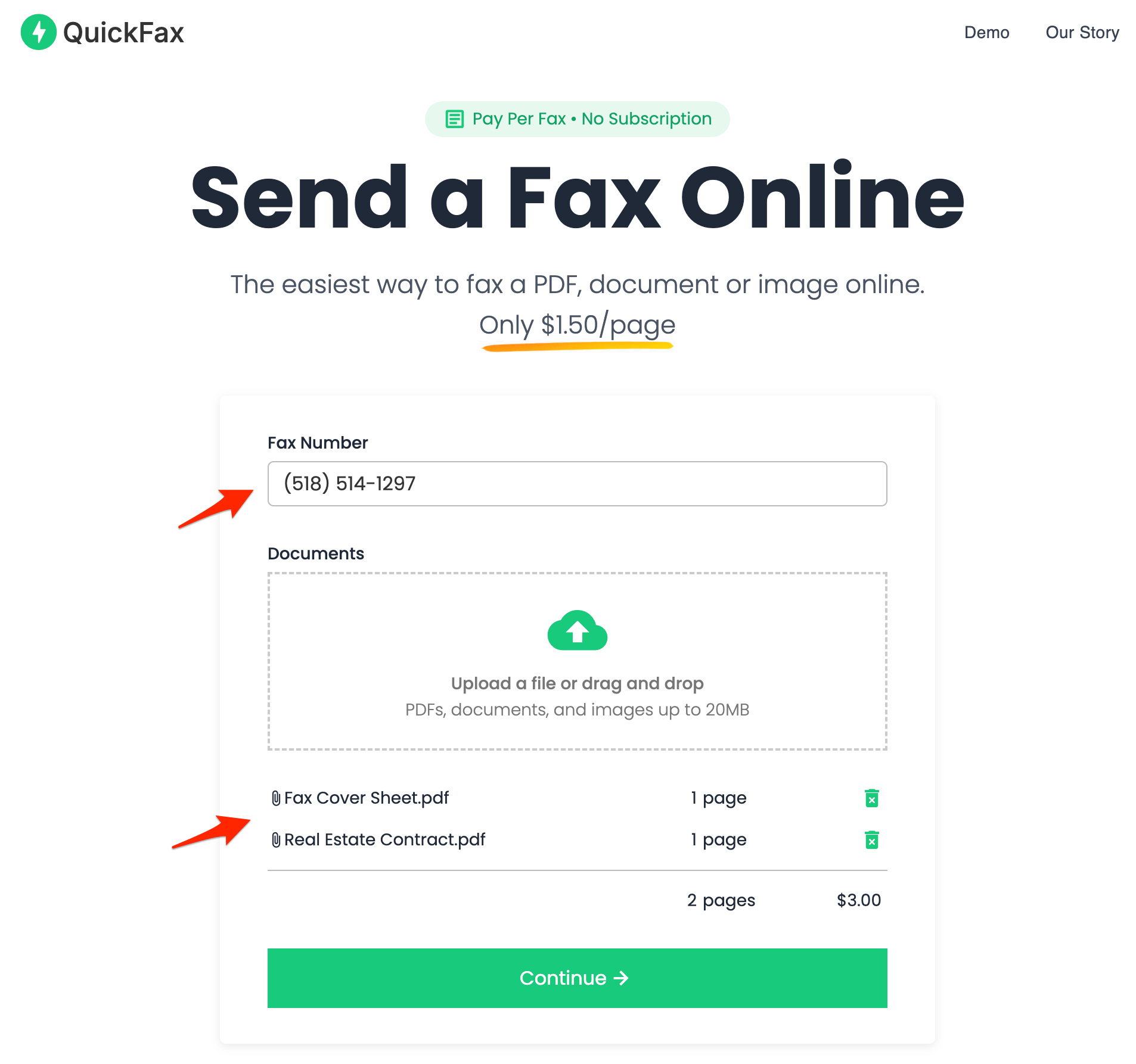
- 2Enter the fax number and upload your documents
You can fax PDFs, Word files (DOC, DOCX), JPG, PNG, and HEIC — including photos taken directly with your phone camera. No conversion needed.
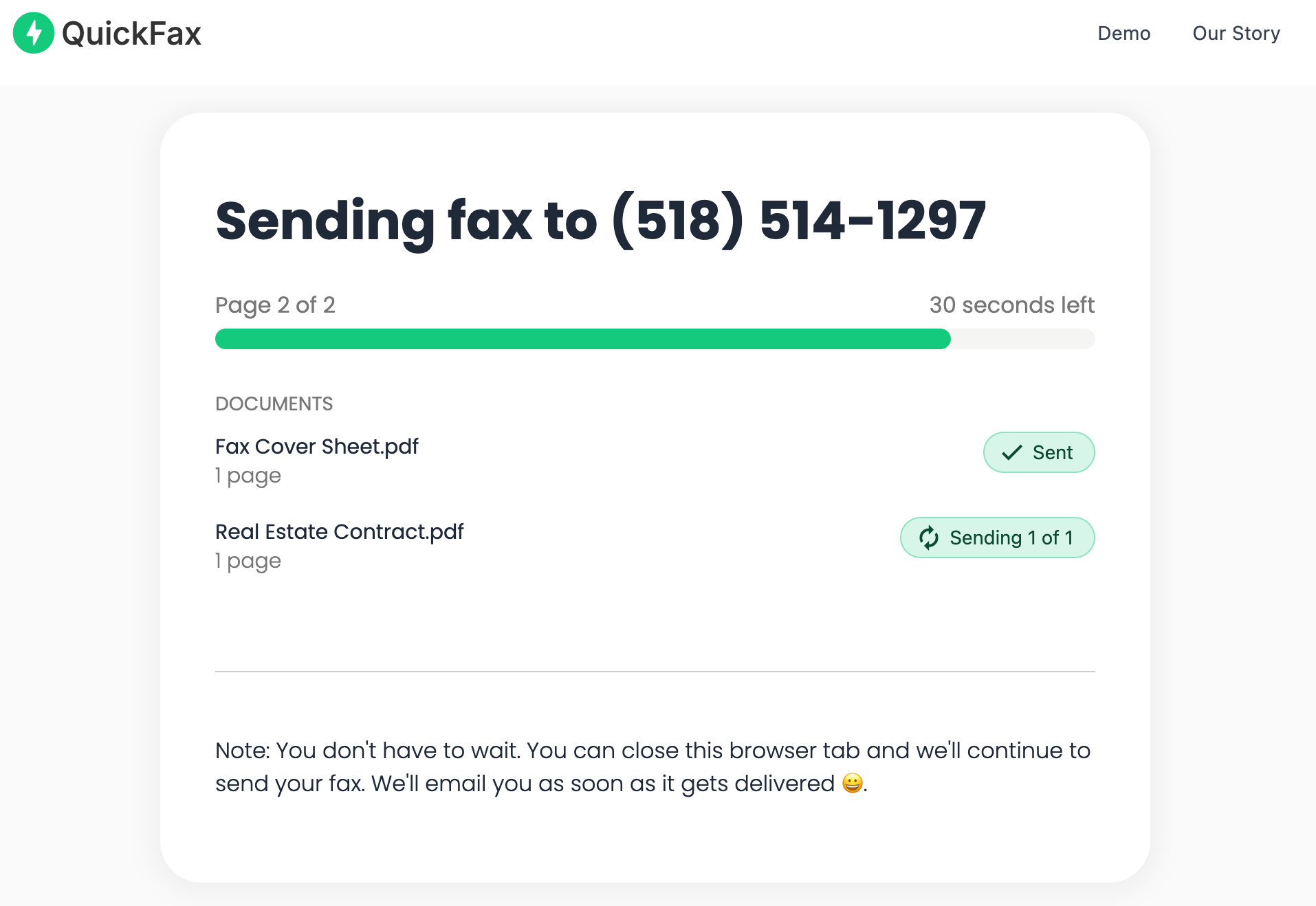
- 3Send your fax and watch it get delivered
Track delivery in real time. Once the fax is received, you get an email confirmation. Your files are then automatically deleted from QuickFax's servers.
Need to send a fax right now?
No account to setup. No subscription to pay. $1.50/page.FedEx Office vs. QuickFax: Full Comparison
| Feature | FedEx Office (in-store) | QuickFax (online) |
|---|---|---|
| Send faxes | ✓ Yes — self-service copier | ✓ Yes — any device, online |
| Receive faxes | ✓ At some locations — call ahead | No |
| Price — local / domestic | ~$2.19 / ~$2.49 (example; varies by store) | $1.50 — all destinations ✓ |
| Price transparency | Some location pages publish prices; FedEx says rates vary | Exact total shown before payment ✓ |
| Account required | No | No |
| Service type | Self-service copier with on-screen prompts | Online upload — no machine, no store |
| Availability | Store hours only (typically Mon–Sat) | 24/7, any device ✓ |
| Cover sheet included | ✓ Complimentary cover sheet + printed confirmation | ✓ Digital cover sheet; email confirmation |
| Document security | Shared public copier; no encryption on device | 256-bit AES encryption; auto-deleted after delivery ✓ |
| Failed fax charge | Unused pre-auth balance returned; failed sends vary by store | Only charged on successful delivery ✓ |
| Best for | Paper originals; receiving inbound faxes; bundled with printing/shipping | Digital documents; urgent after-hours; lowest cost per page; confirmed delivery |
Why Online Faxing Is More Secure Than a Store Fax Machine
Public fax machines in stores aren't exactly known for privacy. Your documents pass through shared equipment, other customers may be nearby, and there's no reliable way to know your data was handled securely.
QuickFax encrypts your files immediately upon upload using 256-bit AES encryption, with TLS 1.2 enforced throughout. Your documents are automatically deleted after successful delivery — or after a failed send attempt. So your fax stays private.
Kind Words from QuickFax Customers
“Fast, secure, the price is right! This site is a blessing for those who rarely have to send a fax.”
Stephen from California
“By far the easiest and most convenient internet fax service I have ever used. Highly recommend.”
John from New Mexico
“I loved that it doesn't require a subscription or a free trial. I just got in and faxed what I needed to.”
Tom from Mississippi
“This was my first time sending a fax this way, and it was very easy. I will definitely use this again. Was much easier then going to a store.”
Elizabeth from Arizona
Trusted by thousands to fax IRS, SSA, legal, medical, government documents, and more.
Send a Fax Online →No subscription. $1.50/page.
FedEx Fax Services — Common Questions
Does FedEx offer fax services?
Yes — but specifically through FedEx Office (Print & Ship Centers) at locations with self-service copiers. Not every FedEx location offers faxing — shipping counters and partner drop-off points do not. Use the FedEx Office store locator and call ahead to confirm your specific location has fax services before making the trip.
How much does it cost to fax at FedEx Office?
FedEx Office states prices vary by store and doesn't publish a national rate. As a representative example, one published FedEx Office location page shows: $2.19 to send a local fax, $2.49 to send a domestic fax, and $1.59 to receive. Your location may differ. QuickFax charges a flat $1.50 per page for all destinations, with the exact total shown before you pay.
Can you receive a fax at FedEx Office?
Some FedEx Office locations can receive incoming faxes for customer pickup, held securely and paid at the counter. Not all locations offer this, and hold times and after-hours policy aren't standardized. Call your specific store before giving out its fax number to a sender.
Is FedEx fax self-service or staff-assisted?
Self-service — you use the in-store copier station with on-screen prompts. You pre-authorize a payment amount, and any unused balance is returned. Team members can assist if you need help. This differs from The UPS Store, which is fully staff-assisted.
What's the difference between FedEx and FedEx Office for faxing?
FedEx shipping counters, drop-off points, and partner locations do not offer fax services. Faxing is available only at FedEx Office (formerly Kinko's) Print & Ship Centers with self-service copiers. If you're at a general FedEx counter asking about faxing, you're at the wrong location — use the FedEx Office store locator to find a Print & Ship Center near you.
Is faxing at FedEx Office cheaper than online?
Typically no. FedEx Office example pricing starts at $2.19 per page for local faxes. QuickFax lets you send a one time fax and charges a flat $1.50 per page — no travel, no machine operation, email delivery confirmation, and 256-bit encryption included. For a 10-page domestic fax, QuickFax saves you roughly $10 before you count travel time and gas.
Ready to Send Your Fax?
Just enter the fax number, upload your documents, and send.
Send a Fax Online →