To fax a PDF online, open QuickFax in your browser. Upload your PDF, enter the recipient's fax number, and pay $1.50/page to send. No account, subscription, or app is required; live status tracking and email confirmation are included. Setup takes about 60 seconds.
How-to Guide
How to Fax a PDF
No fax machine. No subscription. No account required. Upload your PDF and send in about 60 seconds — from any device.
No account to set up. No subscription to pay.
Quick Answer
In This Guide
Step-by-Step
The Easiest Way: Fax a PDF Online with QuickFax
Faxing a PDF without a physical fax machine is straightforward — upload your document, enter a fax number, and send. The process works from any device with internet access: desktop, laptop, smartphone, or tablet.
- 1Go to QuickFax.com
Open QuickFax.com on your phone or computer. It works in any browser, with nothing to download or install.

- 2Enter the fax number and upload your documents
Type the recipient's fax number with its area code. Then upload or drag and drop your documents: PDFs, Word files or images. They're sent in the order you add them, with an optional cover sheet first.
- 3Pay and send your fax
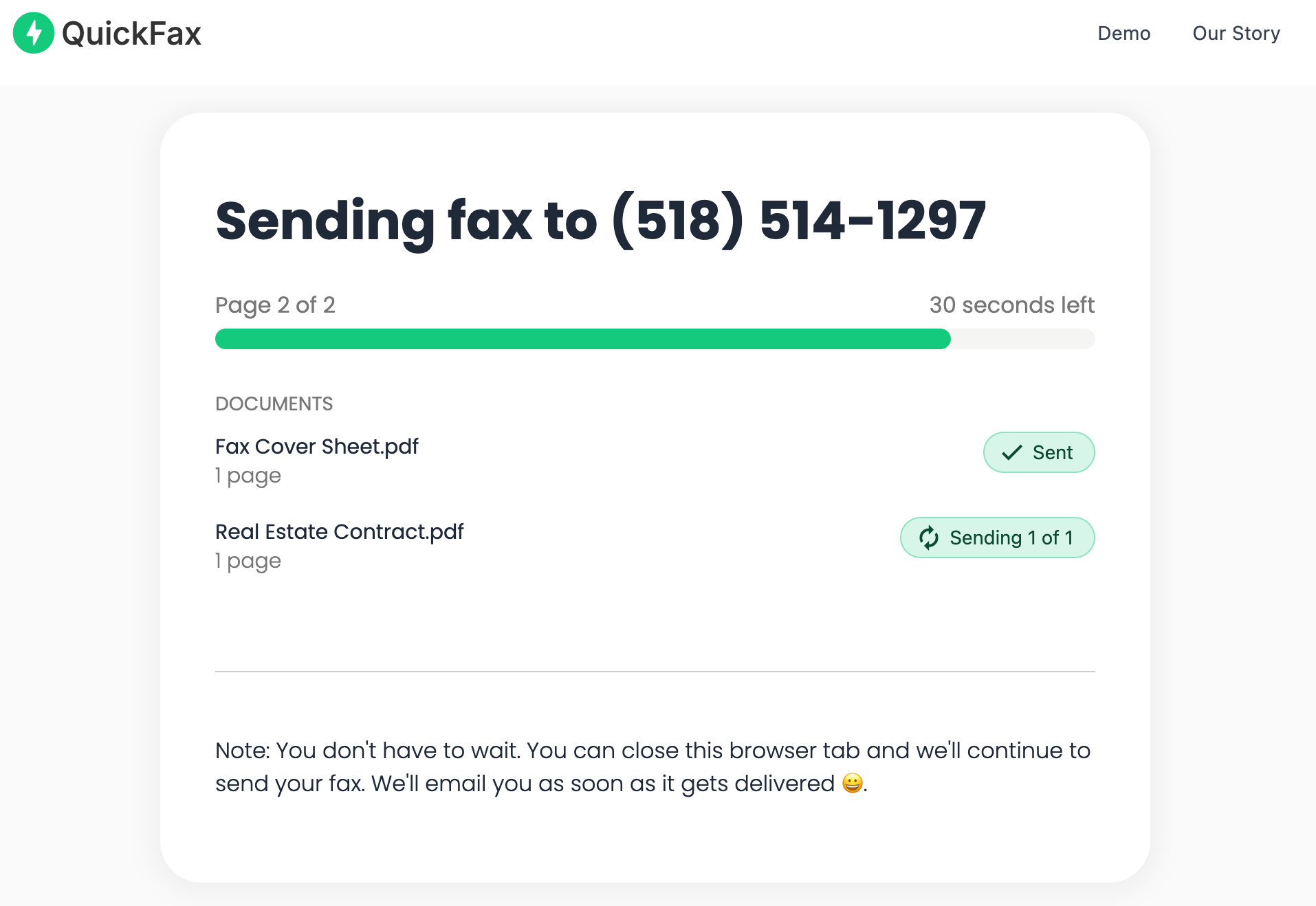
Check the page count and the total price, then pay securely at checkout. You're only charged if the fax is delivered. You can watch it send, or just wait for the confirmation email.
Your PDF is protected and automatically deleted
PDFs are encrypted with 256-bit AES immediately on upload and deleted from QuickFax's servers once the fax is delivered or fails. Your sensitive information doesn't sit on a server indefinitely.
Ready to send your PDF? It takes about 60 seconds.
No account · No subscription · $1.50/page.Desktop
How to Fax a PDF From Your Computer
Faxing a PDF from your computer is the most straightforward approach — you have a large screen to review your document, easy access to files on your hard drive, and a full keyboard for entering fax numbers accurately. Works on Windows, Mac, or Chromebook in any browser (Chrome, Firefox, Safari, Edge) with no software to install.
Open QuickFax.com, click to browse or drag and drop your PDF from your hard drive, enter the fax number, and pay $1.50/page. If your PDF lives in Google Drive, Dropbox, or OneDrive, download it locally first and then upload — total time is 2–3 minutes.
Mobile
How to Fax a PDF From Your Phone
Mobile faxing is ideal when you're away from your desk, need to send something urgently, or don't want to boot up your computer. QuickFax is fully optimized for mobile — open it in Safari (iPhone) or Chrome (Android) and the entire process works the same as on desktop.
Choose a PDF from your files, select from your photo library, or use your phone's camera to scan a physical paper directly — no separate scanner needed. Enter the recipient's fax number, pay, and send. You'll receive email confirmation on your phone once the fax is delivered.
No app download required
Many subscription fax services require you to download an app and create an account before sending anything. QuickFax works directly in your mobile browser — no downloads or signups. Particularly useful for urgent situations when you're at a doctor's office, between meetings, or away from home.
Email-to-Fax
How to Fax a PDF Via Email
Email-to-fax lets you send faxes from email by composing a message addressed to the recipient's fax number at a special domain (e.g., 15551234567@faxservice.com). You attach the PDF just like a normal email attachment.
Requires pre-registration with a fax service
Not all fax services support email-to-fax — and those that do typically require an account first. For a one-time fax, using the direct web interface is faster and doesn't require signup. Email-to-fax is also generally slower, as it depends on email server processing times.
The subject line of your email may become a cover page title, and the body text may appear as cover page notes — depending on the service's configuration. For most one-time fax needs, you're better off going directly to a web-based service like QuickFax rather than configuring email-to-fax.
Pricing
One-Time Fax Services vs. Subscription Services
When you search for how to fax a PDF online, you'll encounter two fundamentally different business models. Understanding the difference can save you money and frustration.
QuickFax — 5-page PDF
$7.50
Pay only when you fax. No subscription to cancel.
vs
Subscription — 1 fax/yr
$120+
$10–$30/month whether you fax or not. Every year.
Subscription services like eFax, MyFax, RingCentral, and Dropbox Fax charge $10–$30/month for a dedicated fax number and outbound faxing. They make sense if you fax more than about a dozen pages per month or need to receive faxes — but they're expensive overkill for anyone who needs to send one PDF right now.
A common scenario: you sign up for a “free trial” to send one urgent document, forget to cancel, and end up paying $240/year for a service you used once. Pay-per-fax avoids the trap entirely — no credit card on file, no auto-renewal, no cancellation flow.
Troubleshooting
What to Do If Your Fax Fails to Send
Even with modern online fax services, transmissions can occasionally fail. Here's how to troubleshoot the most common issues:
●
Check the fax number firstVerify you included the correct area code and didn't transpose any digits. Number errors are the most common cause of failed transmissions.
●
Automatic retries are runningReputable services retry automatically — typically several attempts over a few hours before marking a fax as failed. You'll receive an email either way.
●
Contact the recipient to verifySome organizations have multiple fax numbers for different departments. Confirm you have the right number and that their machine is powered on with paper loaded.
●
Have a backup delivery planFor time-sensitive documents, ask if the recipient can accept secure email or a document sharing service as an alternative if faxing fails repeatedly.
No charge for failed faxes with QuickFax
You only pay for successfully delivered faxes — if a fax fails, QuickFax emails you and you aren't charged.
Compare
Other Online Fax Services Compared
QuickFax is the best option for one-time PDF faxing without a subscription, but here's how the major alternatives compare — so you can choose what's right for your situation:
| Service | Price | Account? | Subscription? | Best for |
|---|---|---|---|---|
| QuickFax | $1.50/page | No | Pay per fax | One-time urgent PDF faxing |
| eFax | From $18.99/mo | Yes | Yes | High-volume business faxing |
| Dropbox Fax | $14.99/mo | Yes | Optional | Teams using cloud storage |
| FaxZero | Free (with ads) | No | No | Very short faxes, US/Canada only |
| MyFax | $10–$30/mo | Yes | Yes | Regular two-way business faxing |
When a subscription makes sense
If you need a dedicated incoming fax number, team collaboration tools, or you're regularly sending more than about a dozen pages per month — subscription services make sense. For everyone else, pay-per-fax is simpler and cheaper.
Kind Words from QuickFax Customers
“Fast, secure, the price is right! This site is a blessing for those who rarely have to send a fax.”
Stephen from California
“By far the easiest and most convenient internet fax service I have ever used. Highly recommend.”
John from New Mexico
“I loved that it doesn't require a subscription or a free trial. I just got in and faxed what I needed to.”
Tom from Mississippi
“This was my first time sending a fax this way, and it was very easy. I will definitely use this again. Was much easier then going to a store.”
Elizabeth from Arizona
Trusted by thousands to fax IRS, SSA, legal, medical, government documents, and more.
Send a Fax Online →No subscription. $1.50/page.
Common Questions
Frequently Asked Questions
Can I fax a PDF without a fax machine?
Yes. Online services like QuickFax let you fax a PDF from any device with an internet connection — no hardware, no phone line, no special equipment needed.
How much does it cost to fax a PDF online?
QuickFax charges a flat $1.50 per page with no account or subscription. A 5-page PDF costs $7.50 total. Subscription services typically run $10–$30/month regardless of usage.
Is faxing a PDF secure for sensitive documents?
Yes. QuickFax uses 256-bit AES encryption and automatically deletes your PDF after delivery. That makes it safe for tax returns, medical records, and legal filings.
How long does it take to fax a PDF?
The upload and setup takes about 60 seconds. Transmission typically takes 1–3 minutes per page.
What if my fax fails to send?
QuickFax emails you if the fax fails, and you aren't charged. You can then retry, verify the number, or contact the recipient to check their fax machine.
What's the maximum file size for a PDF?
QuickFax accepts PDFs up to 20MB. The limit applies to the whole fax, so if your PDF is larger, split it and send it as more than one fax.
Ready to Send Your Fax?
Just enter the fax number, upload your documents, and send.
Send a Fax Online → No account needed No subscription Pay per page