Faxing Guide

How to Fax with a Fax Machine: Complete Guide + Alternatives

Everything you need to know about using a physical fax machine — plus what to do if you don't have one.

Send a Fax Online →

No account · No subscription · Done in 60 seconds

⚡ Quick Answer
When you need to fax something, you have three paths: use a physical fax machine if you have one, drive to a copy store and pay per page, or send a fax online from your phone or computer in under a minute. This guide covers all three — with step-by-step instructions for physical machines and a clear explanation of when online faxing is the faster choice.
Overview

3 Ways to Send a Fax Today

printPhysical Fax Machine
Requires a working phone line and knowledge of the machine. Only practical if you already own or have regular access to one.
Setup required
storeOffice Supply Store
UPS Store, FedEx Office, Staples, Office Depot all offer walk-in faxing for $2-3/page. Requires travel during business hours.
Drive & wait
cloudOnline Fax Service
Upload, enter a fax number, pay $1.50/page. Works from any phone or computer, 24/7. No machine or store visit required.
✓ Recommended
Step-by-Step

Using a Fax Machine: Sending & Receiving

If you have access to a working fax machine, here's the complete process for both sending and receiving faxes side by side.

sendSending a Fax
  1. 1Plug the machine into both a power outlet and a working phone line. Power on and wait for “Ready.”
  2. 2Load your documents in the feeder tray — check for arrows indicating face-up or face-down.
  3. 3Create a cover sheet with recipient name, fax number, your name, and total page count. Place it on top.
  4. 4Dial the complete fax number including area code and any required prefix (like 9 for an outside line in offices).
  5. 5Press Send or Start. Listen for dial tones then high-pitched fax tones — that's the connection.
  6. 6Wait for the machine to scan and transmit each page. Don't remove documents until it finishes.
  7. 7Collect the confirmation page and verify it shows successful delivery.
inboxReceiving a Fax
  1. 1Keep the machine connected to a phone line and powered on at all times.
  2. 2Load sufficient paper in the tray — the machine can't print without it.
  3. 3Check that toner or ink levels are adequate.
  4. 4Set the machine to Auto Answer mode to accept faxes automatically after a set number of rings.
  5. 5Configure Rings to Answer — 2–4 rings for a dedicated fax line, higher if shared with voice calls.
  6. 6When a fax arrives, the machine answers, receives, and prints automatically.
  7. 7Compare printed pages to the cover sheet page count and contact the sender if pages are missing.
No phone line? You can't use a traditional fax machine.

Physical fax machines require an analog landline — VoIP services like Vonage often don't work reliably with fax hardware. If you don't have a landline, skip ahead to the online faxing section.

Troubleshooting

Common Fax Machine Problems — and How to Fix Them

Fax machines fail in predictable ways. Here are the most common issues and what to do about each one.

wifi_offNo dial tone — phone cord disconnected or plugged into the wrong port
Verify the cord is seated in both the wall jack and the machine's 1-LINE or LINE port. Test the line with a regular phone first.
cancelFax won't send or keeps failing — incomplete fax number or recipient machine issues
Confirm you dialed the full number including area code. Verify the recipient's machine is on and has paper. Try again in a few minutes if you get a busy signal.
imagePoor image quality or dark streaks — dirty scanner glass or document feeder
Clean the scanner glass and feeder rollers with a soft cloth and glass cleaner. Ensure the original document is clearly printed.
layersPaper jam — incorrectly loaded paper or dirty feeder rollers
Remove jammed paper carefully following the arrows inside the machine. Clean the rollers with a slightly damp cloth and reload paper properly.
water_dropLow or empty toner — cartridge depleted
Replace the toner cartridge. Keep a spare on hand if you fax frequently.
warningError codes or won't power on — hardware fault or model-specific issue
Consult the user manual for your specific error code, or contact the manufacturer's support line.

Troubleshooting on a deadline?

Spending 30 minutes fixing a fax machine costs more time than it saves. Send a fax right now online for $1.50/page.
Try QuickFax →
Reality Check

The Real Problem: Most People Don't Have a Fax Machine

If you searched “how to use a fax machine,” there's a good chance you don't actually own one. You're probably dealing with an urgent deadline for the IRS, a court, an insurance company, or a medical office — and you just discovered that faxing is required.

Fax machines are increasingly rare in homes and small businesses. They require a dedicated phone line, ongoing maintenance costs for paper and toner, and physical space most people don't want to give up for a device they'd use once or twice a year.

The traditional alternative — driving to Office Depot, Staples, or a UPS Store — means taking time out of your day, waiting in line, and paying $2-3 per page plus service fees. And there's no guarantee the machine is working when you get there.

This is why faxing without a fax machine through an online service has become the go-to choice for most people with occasional fax needs.

QuickFax

Skip the Machine — Fax Online in 60 Seconds

Skip the machine entirely. QuickFax sends faxes directly from your browser — no hardware, no setup, no subscription. Upload your document, enter the recipient's fax number, and watch it send live.

  1. 1
    Go to QuickFax.com

    No app to install. Open the page in any browser — works on iPhone, Android, or desktop.QuickFax.com homepage in a browser

  2. 2
    Upload your document and enter the fax number

    Accepted formats: PDF, Word (.doc/.docx), JPG, PNG, TIFF, HEIC — up to 20MB. No file conversion needed, just upload what you have.QuickFax upload documents interface

  3. 3
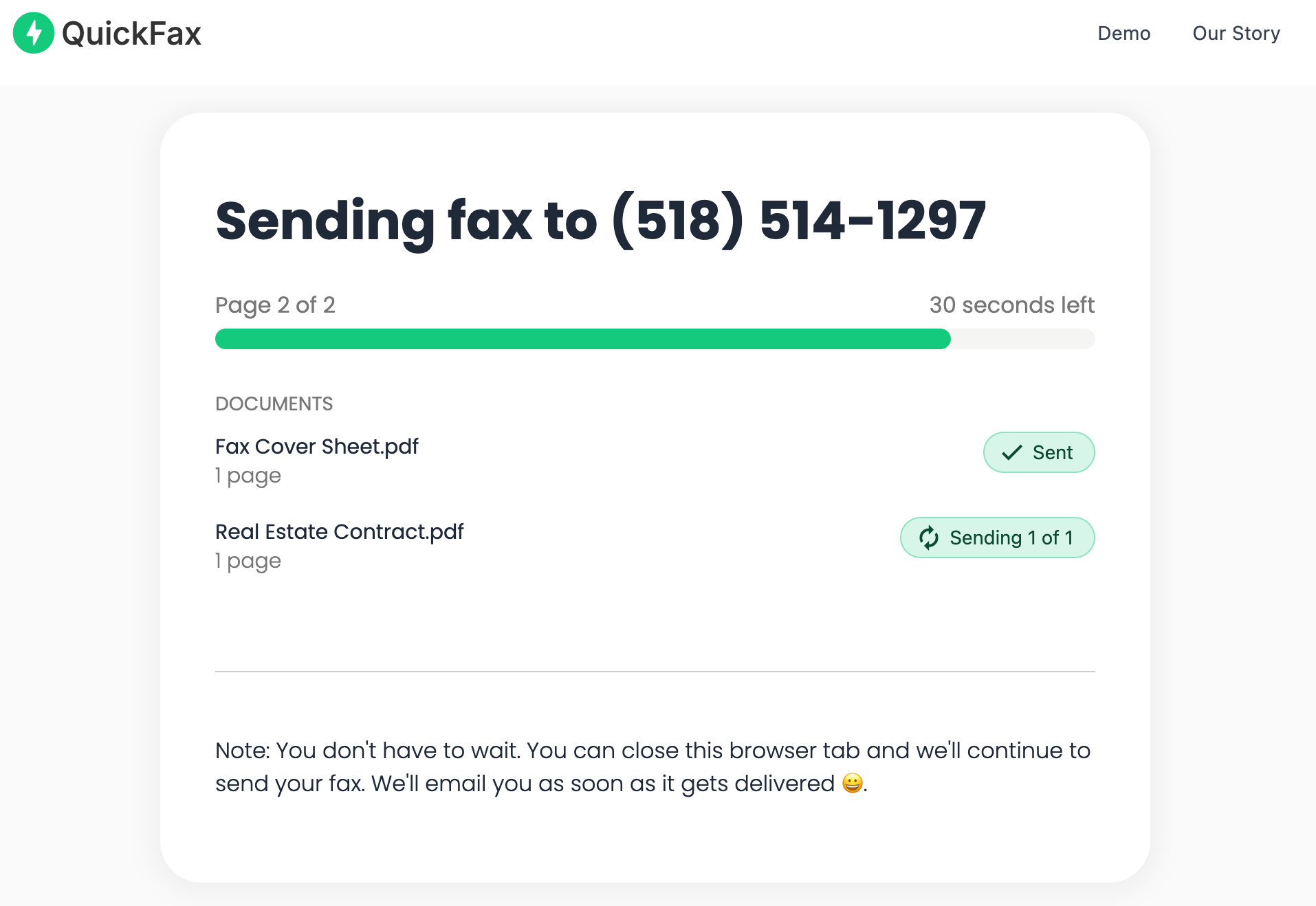
    Pay $1.50/page and watch it send

    Live status page shows uploading → converting → dialing → transmitting → delivered. Email confirmation sent on success.QuickFax live fax sending status page

checkNo account or sign-up required
checkLive delivery status page
checkEmail confirmation of delivery
checkWorks on iPhone, Android, laptop, desktop
checkNo subscription — pay only for what you send
checkAvailable 24/7, including weekends

Send your fax in 60 seconds.

No account · No subscription · $1.50/page · Live delivery confirmation.
Send a Fax Online →
Alternatives

Other Online Fax Services

If QuickFax's pay-per-fax model isn't what you're looking for, here are the main subscription alternatives — though most are overkill for occasional use.

eFaxfrom $16.99/month
One of the oldest online fax services. Good for businesses that send and receive faxes daily. Requires account creation and subscription. Many users forget to cancel after their one-time need. A popular eFax alternative for occasional senders is a pay-per-fax service.
Subscription required
HelloFax (Dropbox)from $9.99/month
Integrates with Google Workspace and Dropbox, making it convenient if you're already in that ecosystem. But a subscription is still required — making it a costly option if you just need one fax. For those seeking a HelloFax alternative without a monthly plan, pay-per-page services are the better fit.
Subscription required
MyFaxfrom $10/month
Offers dedicated local and toll-free fax numbers, useful if you receive faxes regularly. Complete overkill if you just need to send a single document. Monthly fees add up fast for someone who only faxes a few times a year.
Subscription required
When do subscriptions make sense?

Monthly fax plans are worth it if you're sending 10+ faxes per week, need a dedicated inbound fax number, or require integrations with business software. For everyone else — especially occasional faxers — a one-time fax service is significantly cheaper and simpler.

Edge Cases

When You Actually Need a Physical Fax Machine

For the vast majority of personal and small business faxing, online services work perfectly. But there are a handful of edge cases where a physical machine is specifically required.

gavel

Certified government transmissions. Some highly secure legal or government processes require faxing from specific certified machines that produce auditable transmission records. In these rare cases, check with the receiving agency before assuming online faxing is accepted.

medical_information

Certain HIPAA-governed workflows. Some healthcare facilities maintain dedicated physical fax machines for specific compliance workflows.

speed

You're standing at a working machine right now. If you already have your documents loaded and the machine is ready to go, sending from there may be faster than switching to your phone — though this scenario is increasingly rare.

business

High-volume enterprise faxing. Organizations sending hundreds of faxes daily may use specialized multi-line fax servers that are more cost-effective than per-page online pricing. This doesn't apply to individual users with occasional needs.

Need to send a fax now?

Send a fax from your computer or phone right now — no equipment, no store visit, just $1.50/page.
Send a Fax Online →
Background

Why Faxing Still Exists in 2026

Faxing feels outdated, but it persists in critical industries because of legal precedent, bureaucratic inertia, and the transmission record it creates. Here's the short version:

receiptProof of transmission

Fax transmissions create a clear, timestamped record of when documents were sent and received — unlike email, where delivery can be disputed.

account_balanceGovernment systems

The IRS, Social Security Administration, and many state courts built their internal workflows around fax decades ago and haven't fully modernized.

medical_informationHealthcare compliance

HIPAA regulations were written when fax was the primary electronic transmission method, so faxing remains deeply embedded in medical records workflows.

editSigned documents

Many legal and financial documents require ink signatures. Faxing a signed document is often the fastest way to transmit it without mailing physical papers.

shieldPerceived security

Faxed documents travel over phone lines and can't be easily forwarded or altered after receipt, making them preferred in some regulated environments.

hourglass_emptyInstitutional inertia

Large bureaucratic systems change slowly. Faxing persists not because it's the best technology, but because switching costs are high for entrenched organizations.


Kind Words from QuickFax Customers

Fast, secure, the price is right! This site is a blessing for those who rarely have to send a fax.

Stephen from California

By far the easiest and most convenient internet fax service I have ever used. Highly recommend.

John from New Mexico

I loved that it doesn't require a subscription or a free trial. I just got in and faxed what I needed to.

Tom from Mississippi

This was my first time sending a fax this way, and it was very easy. I will definitely use this again. Was much easier then going to a store.

Elizabeth from Arizona

Trusted by thousands to fax IRS, SSA, legal, medical, government documents, and more.

Send a Fax Online →

No subscription. $1.50/page.

FAQ

Frequently Asked Questions

Do I need a landline phone to send a fax?

If you're using a physical fax machine, yes — traditional machines require an analog phone line. Online fax services work entirely over the internet with no phone line required, which is why they're more practical for most people today.

How do I know if my fax went through successfully?

Physical fax machines print a transmission report showing whether the fax was delivered or failed. With QuickFax, you get a live status page showing real-time progress plus an email confirmation when delivery is complete — giving you more certainty than a traditional machine's codes.

Can I fax from my iPhone or Android phone?

You can't fax directly from a smartphone without a service. QuickFax's mobile-optimized website lets you fax from your phone — including photos from your camera — in about 60 seconds on any iOS or Android device.

Which way do documents go in the fax machine?

It varies by model. Look for small diagram arrows on or near the document feeder tray, or check the user manual for your specific machine. Loading documents incorrectly results in blank faxes being sent.

How much does it cost to send a fax?

Using a fax machine at Office Depot or UPS Store typically costs $2-3 per page plus potential service fees. QuickFax charges a flat $1.50 per page with no additional fees, making it cost-competitive while being significantly more convenient.

Are faxes secure and private?

Traditional fax machines send documents over phone lines without encryption — relatively secure but not strongly protected. QuickFax uses 256-bit AES encryption and automatically deletes files after transmission, providing stronger security than physical fax machines and far more privacy than a public copy store machine.

What if the fax fails or doesn't go through?

Common reasons include an incorrect fax number, the recipient's machine being out of paper or toner, or a poor phone line connection. Physical machines print an error report but you've already paid. QuickFax shows real-time transmission status — you can see immediately if there's an issue and retry without extra charges for failed attempts.

Ready to Send Your Fax?

Just enter the fax number, upload your documents, and send.

Send a Fax Online →
No account needed No subscription $1.50/page Supports photos & PDFs Delivery confirmation Files deleted after faxing
© 2026 QuickFax LLC