Faxing Guide

How to Fax by Phone:
The 2026 Guide

No fax machine, no app download, no subscription. Send a fax from your phone in under 60 seconds — works on iPhone and Android.

No account to setup. No subscription to pay.

⚡ Quick Answer

You can send a fax from your phone right now — no app download, no account, no subscription. Open QuickFax.com in your phone's browser (Safari or Chrome), upload your document, enter the recipient's fax number, and pay $1.50 per page. Done in under 60 seconds. Works on iPhone and Android.

The Basics

What Does It Mean to Fax by Phone?

Faxing by phone means sending fax documents using your smartphone instead of a traditional fax machine. Instead of transmitting through a phone line, your document travels over the internet — WiFi or cellular data — to the recipient's fax machine or digital fax inbox.

You can fax from your cell phone using documents you already have: PDFs in your email, photos from your camera roll, files from cloud storage apps like Google Drive or Dropbox, or images from text messages. The fax arrives at the destination looking exactly like one sent from a traditional machine.

Both iPhone and Android work. No special hardware or phone line required — just your phone and an internet connection.

Quality is actually better than traditional faxing

Faxes sent from your phone are transmitted digitally, so there's no signal degradation from phone line interference. PDFs maintain their original clarity, and even photos of documents come through at the standard fax resolution (200 × 98 DPI) or better.

Your Options

Your Three Options for Mobile Faxing

✓ Best for one-time faxing
  • Browser-based fax service (QuickFax)
  • Visit the website in your phone's browser, upload your document, send
  • No app download, no account, no subscription — pay per page
  • Fastest way to send a fax from your phone for one-time or occasional use
OK for frequent faxers
  • Mobile fax apps (eFax, HP Smart, Fax.Plus)
  • Download an app, create an account, subscribe to a monthly plan
  • Convenient for high-volume users who fax multiple times per week
  • Adds 5–10 minutes of setup friction for a one-time fax
Requires existing account
  • Email-to-fax
  • Send an email with your document attached to a special fax number address
  • Only works if you already have an account with a service that supports this
  • Not useful for one-time situations

For most people reading this guide, browser-based faxing is the right answer. If you're faxing more than 10–15 times per month and need to receive faxes too, a subscription app may eventually pay for itself — but for everyone else, pay-per-fax is simpler and cheaper.

Step by Step

How to Fax From Your Phone Using QuickFax

Here's exactly how to fax from your smartphone using QuickFax — no app, no account, works on any phone:

  1. 1
    Open QuickFax.com in your browser

    Go to QuickFax.com in Safari (iPhone) or Chrome (Android). The mobile-optimized site loads immediately — no download, no login screen.QuickFax.com homepage open in a mobile browser

  2. 2
    Upload your document and enter the fax number

    Tap the upload area and select your file from your phone's storage, camera roll, email, or cloud apps like Google Drive or Dropbox. QuickFax accepts PDFs, Word docs (.doc, .docx), and images (JPG, PNG, HEIC) up to 20MB. Then type in the recipient's fax number including area code.QuickFax upload documents interface on a mobile phone

  3. 3
    Pay $1.50/page and send — then watch it deliver

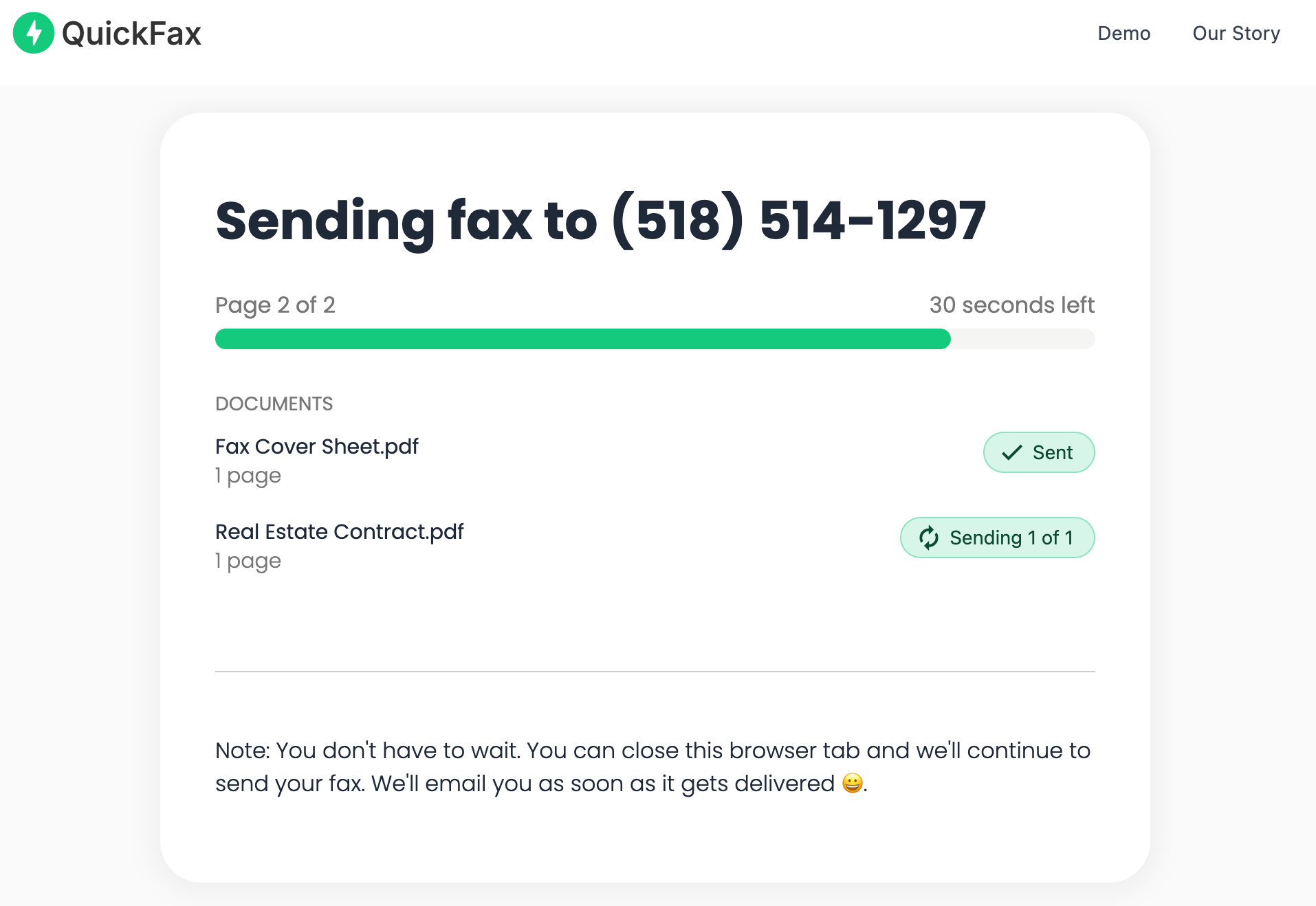
    Enter your card details. No subscription, no hidden fees — just $1.50 per page, one time. A live status page shows your fax progressing through Sending → Delivered, and QuickFax emails you a confirmation once it's received — important proof for IRS filings, legal documents, or medical forms.QuickFax live fax sending status page on a mobile phone

Your files are protected and deleted automatically

Documents are encrypted with 256-bit AES encryption immediately on upload and automatically deleted once the fax is delivered. Your sensitive documents don't sit on a server indefinitely.

Send your fax right now — from any phone.

No app. No account. $1.50/page.
Send a Fax Online →
Comparison

Mobile Fax Apps Compared

If you fax regularly and want a dedicated app, here's how the main options stack up against QuickFax:

ServicePricingApp?Account?Best for
QuickFax$1.50/page, pay-per-faxNoNoOne-time & occasional faxing
HP SmartFree (25 pages/fax)YesYesHP printer owners
eFaxFrom $16.99/monthYesYesHigh-volume business faxers
Fax.PlusFrom $6.99/monthYesYesLight regular use
Simple Fax & similar$3.99–$39.99/monthYesYesVolume faxers
The hidden cost of “free” fax apps

Many apps advertise free faxing but limit you to 3–10 pages and auto-charge monthly after a free trial. Users frequently forget about these subscriptions and get billed for months they never used the app. For anything important — IRS submissions, court filings, medical records — use a service with transparent pricing and real delivery confirmation.

The main advantage of apps is convenience for repeat faxers: saved fax history, stored contacts, and syncing across devices. But if you're reading this guide, you probably need to send one fax — and for that, faxing without an app on QuickFax is faster and cheaper than any subscription.

Use Cases

When Phone Faxing Makes the Most Sense

Despite being decades-old technology, faxing is still required by many government agencies, healthcare providers, courts, and financial institutions in 2026. Here are the situations where being able to fax from your mobile phone saves the day:

Fax to the IRS

Submit tax forms and IRS correspondence on deadline from anywhere.

Fax medical records

Send insurance forms, prescriptions, and medical history to providers.

Fax legal documents

Court filings, contracts, and signed agreements that require fax delivery.

Fax to Social Security

SSA still requires faxed documents for many requests and applications.

Fax mortgage documents

Title companies, lenders, and escrow offices that require fax submission.

Fax insurance claims

Claim forms and supporting documentation to insurance carriers.

Phone faxing is particularly valuable when you're away from the office, working remotely, or facing a same-day deadline after business hours. Instead of driving to a FedEx Office or UPS Store (which charge $2-3/page anyway, plus your time and gas), you can handle it from wherever you are in under a minute.

⚡ QuickFax — 5 pages
$7.50
Pay once. No account. Sent from your phone in 60 seconds.
Subscription service — 1 year
$120+
$10/month minimum, even in months you never fax a single page.
Why QuickFax

Why QuickFax Is the Simplest Way to Fax From Your Phone

Most fax services make you jump through hoops before sending anything — download an app, create an account, enter your card details, pick a plan, verify your email. That's 5–10 minutes of friction when you just need to get one document sent.

QuickFax removes every unnecessary step. Here's what makes it the easiest way to send a fax from a phone:

No app to download

Works in Safari or Chrome. No storage space used, no permissions to grant.

Fax without an account

No email, no password, no personal information required beyond your payment.

Fax without a subscription

Pay $1.50 per page only when you actually fax. Nothing more.

Mobile-optimized interface

Built for thumbs — large upload buttons, simple forms, seamless access to Photos, Files, Google Drive, and Dropbox.

Transparent pricing

You see exactly what you're paying before you confirm. No surprise charges.

Delivery confirmation

Live status tracking plus an email confirmation with date and time — required as proof by many government and legal offices.

Whether you need to send one fax to the IRS, a hospital, a title company, or a court, QuickFax gets you from “I need to send this” to “It's done” faster than any other option — without creating yet another account or committing to a monthly bill.

Kind Words from QuickFax Customers

Fast, secure, the price is right! This site is a blessing for those who rarely have to send a fax.

Stephen from California

By far the easiest and most convenient internet fax service I have ever used. Highly recommend.

John from New Mexico

I loved that it doesn't require a subscription or a free trial. I just got in and faxed what I needed to.

Tom from Mississippi

This was my first time sending a fax this way, and it was very easy. I will definitely use this again. Was much easier then going to a store.

Elizabeth from Arizona

Trusted by thousands to fax IRS, SSA, legal, medical, government documents, and more.

Send a Fax Online →

No subscription. $1.50/page.

FAQ

Common Questions About Faxing From Your Phone

Do I need a special phone to fax?

No. Any smartphone with internet access works — iPhone or Android. You don't need any special hardware, phone line, or equipment beyond what you already own. If your phone can load a website, it can send a fax online.

Does faxing from my phone cost money?

Yes, most methods involve some cost. Subscription apps typically charge $3.99–$39.99/month. QuickFax charges $1.50 per page with no subscription — a 3-page fax costs $4.50 total. Truly free options usually limit you to a few pages and still require account creation, making them more hassle than they're worth for important documents.

Can I fax a PDF from my phone?

Yes. QuickFax lets you fax a PDFdirectly from your phone's Files app, email, or cloud storage. PDFs maintain their original quality and are the recommended format for clean, professional-looking faxes. You can also fax Word documents and images.

Can I fax from an Android phone?

Yes. QuickFax works in Chrome on Android just like it does on iPhone. Open QuickFax.com, upload your document from your Android's storage or Google Drive, enter the fax number, and send. Faxing from Android takes the same 60 seconds as on any other device.

Will the fax quality be good enough?

Yes. Faxes sent from your phone are transmitted digitally at the standard fax resolution (200 × 98 DPI). In many cases, the quality is actually better than a traditional fax machine since there's no signal degradation from phone line interference. As long as your document is readable on your screen, it will fax clearly.

Is it secure to fax sensitive documents from my phone?

Yes. QuickFax uses 256-bit AES encryption — the same standard as online banking — to protect your files during upload and transmission. Documents are automatically deleted after delivery. This is more secure than traditional fax machines that print documents in shared office spaces where anyone can see them.

Do I need to be able to receive faxes too?

Not for most one-time situations. If you're faxing a document to a government agency, medical office, or court, you typically only need to send — not receive. QuickFax is a send-only service. If you need a dedicated inbound fax number, subscription services like eFax or Fax.Plus include that feature.

What if my fax doesn't go through?

QuickFax notifies you immediately with the specific reason — busy signal, disconnected number, out of paper, etc. You can retry sending or contact the recipient to let them know their fax machine isn't accepting incoming calls.

How long does it take to fax from a phone?

With QuickFax, you can upload, pay, and send in under 60 seconds. Transmission itself takes 30 seconds to 2 minutes per page. Apps take longer initially due to download and account setup, but become faster for repeat faxing.

Ready to Send Your Fax?

Just enter the fax number, upload your documents, and send.

Send a Fax Online →
No account needed No subscription $1.50/page Supports photos & PDFs Delivery confirmation Files deleted after faxing
© 2026 QuickFax LLC