Faxing Guide

How to Fax From Email: The Complete Guide + Simpler Way

Gmail and Outlook can't send faxes on their own. Here's how email-to-fax actually works — and why most people end up choosing a simpler alternative.

Send a Fax Online →

No account · No subscription · Done in 60 seconds

⚡ Quick Answer
Gmail, Outlook, and Yahoo can't send faxes on their own. Email and fax use completely different communication protocols. To send a fax online, you need a third-party service to bridge the gap — or skip the email route entirely and fax directly from your browser with QuickFax.com.
Pipeline

How Email-to-Fax Actually Works

Email-to-fax services act as a converter between two incompatible systems: your email client and the recipient's fax machine. Here's the full pipeline, from the moment you hit send to when the document prints on the other end.

mail
You Compose Email
Attach doc, use special To address
cloud
Service Receives
Parses fax number from address
autorenew
File Converted
Doc → TIFF/PDF fax format
phone_forwarded
Number Dialed
Service dials recipient over phone network
send
Fax Transmits
Document sent page by page
mark_email_read
Confirmation Email
Success or failure emailed back to you

Understanding this process explains two things: why there's no “free” way to fax from email (someone has to run fax servers and phone lines), and why things break — any link in that six-step chain can fail.

Step-by-Step

Step-by-Step: How to Send a Fax From Email

Once you've chosen a service and created an account, here's the process for sending a fax through your email client.

  1. 1
    Sign up for an email-to-fax service

    Most services (eFax, Fax.Plus, HelloFax, iFax) require account creation before you can send. Have your email and payment info ready.

  2. 2
    Find your service's email-to-fax address format

    Check your account dashboard or welcome email. The format is usually faxnumber@servicedomain.com — each service uses a different domain.

  3. 3
    Open your email and compose a new message

    Works with Gmail, Outlook, Apple Mail, Yahoo — any standard email client.

  4. 4
    Enter the fax number in the To field using the special format

    For example: 5551234567@faxservice.com. Remove all dashes, spaces, and parentheses from the fax number. Include country code for international faxes (e.g. 441234567890@service.com for UK).

  5. 5
    Add a subject line and optional cover page text

    Some services use the subject line as the cover page title. Others ignore it — check your service's documentation. You can type a cover message in the email body if the service supports it.

  6. 6
    Attach your document and send

    PDF, DOC, DOCX, JPG, PNG, and TIFF are generally accepted. Keep total attachment size under the limit (usually 20MB). Click Send and wait for a confirmation email.

Watch out for these common formatting mistakes.

The most frequent reason faxes fail: using the wrong domain for your service, leaving spaces or dashes in the fax number, or forgetting the country code. Double-check the format in your service's dashboard before sending anything urgent.

Pricing

Popular Email-to-Fax Services — Real Costs Compared

Most services offer a free trial to get you signed up, then push you toward monthly subscriptions. Here's what you'll actually pay once the trial ends.

ServiceFree TrialPer-Page CostMonthly PlanAccount Required
eFaxLimitedSubscription only$16.95–$19.95/moYes Subscription
Fax.Plus10 free pages$0.99–$1.99/page$5.99–$19.99/moYes Freemium
HelloFax5 free pages$1.99/fax$9.99+/moYes Freemium
iFaxFree trialSubscription only$8.99–$24.99/moYes Subscription

A $20/month subscription costs $240 per year even if you only send 3 faxes. QuickFax's pay-per-fax pricing means a 4-page fax costs $6 total — no monthly commitment.

Pros & Cons

Email-to-Fax: Pros, Cons, and Why Users Get Frustrated

thumb_up Pros
  • Works from your existing email client — no new software to learn
  • Accessible from any device that has email
  • Keeps a record of sent faxes in your email sent folder
  • Good value if you're already paying for a subscription that includes it
thumb_down Cons
  • Must remember a specific email format that varies by service
  • Requires account creation before sending anything
  • No real-time status — you wait passively for a confirmation email
  • Most services push subscriptions even for one-time needs

These aren't hypothetical — they're the real frustrations users report after trying email-to-fax:

I tried emailing my fax but I forgot the format and it bounced back three times.

Format confusion

I sent the email but I don't know if the fax actually went through until I get a confirmation email hours later.

No real-time status

I created an account for a one-time fax and now I keep getting charged $15/month.

Subscription trap

My attachment wasn't accepted — I had to convert it to PDF first just to send one page.

File format issues

Need to send a fax right now?

No account. No subscription. $1.50/page. Live delivery confirmation.
Send a Fax Online →
QuickFax

QuickFax: Skip the Email Format, Fax Directly From Your Browser

Instead of routing your fax through email with special formatting, QuickFax lets you send a fax online directly from your web browser — in about 60 seconds, with no account required.

QuickFax vs. Email-to-Fax: Side by Side

$1.50/page · No account · No subscription · Live delivery status

✗ Email-to-Fax
  • closeCreate an account first
  • closeMemorize special email format
  • closeWait for confirmation email
  • closePushed toward subscription plans
  • closeDoc sits in your sent folder
✓ QuickFax
  • checkNo account needed
  • checkJust upload and enter fax number
  • checkLive status on screen as it sends
  • checkPay $1.50/page, done — no subscription
  • checkFiles deleted after delivery
  1. 1
    Go to QuickFax.com

    No app to install. Open the page in any browser — works on iPhone, Android, or desktop.QuickFax.com homepage in a browser

  2. 2
    Upload your document and enter the fax number

    Accepted formats: PDF, Word (.doc/.docx), JPG, PNG, TIFF, HEIC — up to 20MB. No file conversion needed, just upload what you have.QuickFax upload documents interface

  3. 3
    Pay $1.50/page and watch it send

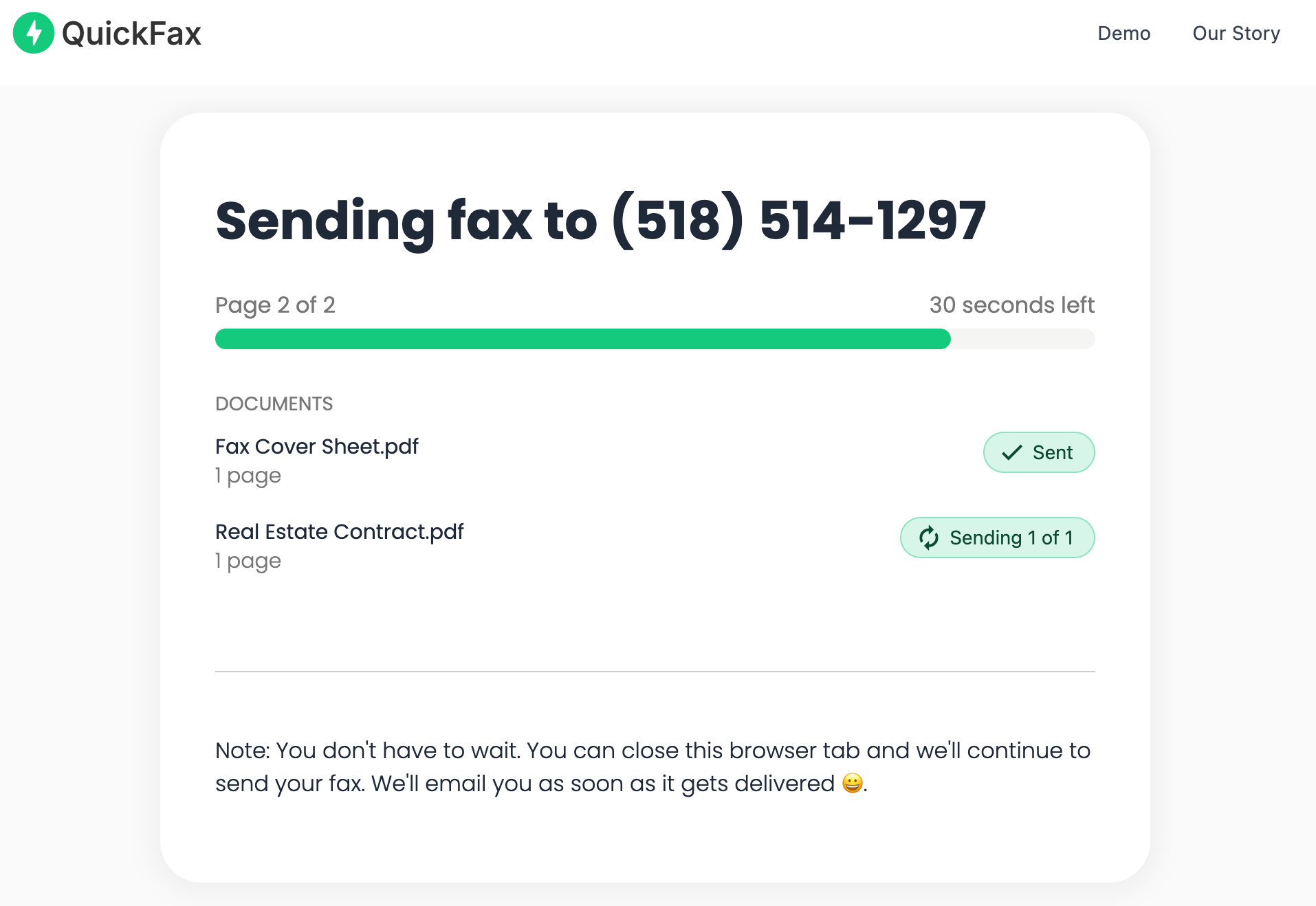
    Live status page shows uploading → converting → dialing → transmitting → delivered. Email confirmation sent on success.QuickFax live fax sending status page

Send your fax in 60 seconds.

No account · No subscription · $1.50/page · Live delivery confirmation.
Send a Fax Online →
Alternatives

Other Ways to Send a Fax (Without Email)

Email-to-fax is one path. Here are the other options, with an honest take on each.

public
Web-based online fax service (like QuickFax)

Upload directly through a website — no email middleman. Faster feedback, clearer status, and no formatting rules to remember. The easiest way to send a fax for most people.

smartphone
Mobile fax apps

Download an iOS or Android app, scan with your camera, send through the app. Convenient for mobile-first users but usually requires account creation and subscription plans.

store
Physical locations (UPS Store, FedEx Office, Office Depot)

Walk in with your document and pay $1–2 per page. Requires travel, operates during business hours only, and you can't always verify the machine is working until you get there.

desktop_windows
Windows Fax and Scan

Built into Windows, technically free — but requires a fax modem and active phone line connected to your PC. Most people no longer have this hardware, making it impractical for the vast majority of users.

Decision

When Email-to-Fax Makes Sense — and When It Doesn't

check_circle Email-to-fax is a good fit if…
  • check_circleYou already have a subscription that includes it as a feature
  • check_circleYou send 5+ faxes per month and want to stay in your email workflow
  • check_circleYour team already uses an email-to-fax workflow you need to conform to
  • check_circleYou need to programmatically send faxes as part of an automated system
cancel Skip email-to-fax if…
  • cancelYou just need to send one fax right now
  • cancelYou're confused about the formatting requirements
  • cancelYou're on a deadline and need immediate status confirmation
  • cancelYou don't want to create another account or subscription
Most people searching this end up in the second column.

If you found this article because you need to fax something to the IRS, a medical office, or a legal department — a direct web-based fax service is faster, simpler, and has no account or formatting requirements. It's the best way to send a fax for occasional needs.

Troubleshooting

Troubleshooting Common Email-to-Fax Issues

error"My email bounced back with an error"
Almost always a formatting problem. Check: did you include the @ symbol, use the correct domain for your service, remove all spaces and dashes from the fax number, and include a country code if sending internationally? Log into your account dashboard for the exact format.
error"The fax failed to send" confirmation email
Common causes: the recipient's fax line is busy or disconnected, the number is incorrect, their machine is out of paper or has technical issues, or there's a problem on the fax service's network. Most services retry automatically — check your account dashboard for retry status.
error"My attachment wasn't accepted"
Check that your file is a supported format (PDF, DOC, DOCX, JPG, PNG, TIFF are usually safe), is under the size limit (typically 20MB total), isn't corrupted, and doesn't have password protection that prevents conversion. Converting to PDF first solves most attachment issues.
error"I sent the email but never received a confirmation"
Check your spam/junk folder first — service confirmations often get filtered. Also verify you sent from the email address registered with the service (some services only process emails from verified addresses), and confirm email notifications are enabled in your account settings.
error"The fax quality was poor or pages were missing"
Light text, fine details, and very high-resolution images don't always survive fax transmission. Ensure the original document is clearly printed, try reducing image resolution, and send in smaller batches if pages are consistently missing.
error"I can't remember my service's email format"
Log into your account and look for "email to fax" instructions in the dashboard, help center, or account settings. Most services prominently display the correct format. Consider saving the format as a contact in your email client for easy reuse.

Need to send a fax right now?

No account. No subscription. $1.50/page. Live delivery confirmation.
Send a Fax Online →

Kind Words from QuickFax Customers

Fast, secure, the price is right! This site is a blessing for those who rarely have to send a fax.

Stephen from California

By far the easiest and most convenient internet fax service I have ever used. Highly recommend.

John from New Mexico

I loved that it doesn't require a subscription or a free trial. I just got in and faxed what I needed to.

Tom from Mississippi

This was my first time sending a fax this way, and it was very easy. I will definitely use this again. Was much easier then going to a store.

Elizabeth from Arizona

Trusted by thousands to fax IRS, SSA, legal, medical, government documents, and more.

Send a Fax Online →

No subscription. $1.50/page.

FAQ

Frequently Asked Questions

Can I fax directly from Gmail or Outlook?

No. Faxing from Gmail or Outlook requires a third-party service — you can't type a fax number in the To field and have it work. You either sign up for an email-to-fax service or use a web-based alternative like QuickFax that doesn't involve email at all.

Do I need a fax machine to fax from email?

No. Email-to-fax services maintain fax servers and phone lines on your behalf — that's the whole point. You also don't need a fax machine with web-based services like QuickFax, which lets you fax without a fax machine from any phone or computer.

How much does it cost to fax from email?

Most email-to-fax services charge $10–25/month on subscription plans, or $0.99–$1.99 per page on pay-as-you-go plans. QuickFax charges a flat $1.50 per page with no subscription, no account, and no hidden fees — making it one of the most cost-effective options for occasional senders.

Is faxing from email secure?

Reputable services encrypt transmission, but email itself has limitations — your document sits in your sent folder and your email provider can technically access it. Direct web services like QuickFax offer equivalent or better security because the document never touches your email system: it's encrypted on upload and deleted after delivery.

What file types can I attach when faxing from email?

Most email-to-fax services accept PDF, DOC, DOCX, JPG, PNG, and TIFF, with a size limit of around 20MB. When in doubt, convert your document to PDF first — it's universally accepted and produces the most consistent fax quality.

How do I know if my fax was delivered?

Email-to-fax services send a confirmation email when the fax succeeds or fails — you wait passively for it. Services like QuickFax show a live status page so you watch delivery happen on screen in real-time. You also receive an email confirmation, but you don't have to sit there refreshing your inbox to find out.

Do I need a dedicated fax number to send faxes from email?

No — a dedicated fax number is only required if you want to receive faxes. For sending only, you just need access to a fax service. Note that some subscription plans bundle a receiving number whether you want it or not. QuickFax is send-only with no subscription, so you only pay for what you actually use.

Can I fax internationally from email?

Most services support international faxing, but you'll need to include the country code in the email address format (e.g. 441234567890@service.com for a UK number), and international faxes typically cost $3–5 per page.

Ready to Send Your Fax?

Just enter the fax number, upload your documents, and send.

Send a Fax Online →
No account needed No subscription $1.50/page Supports photos & PDFs Delivery confirmation Files deleted after faxing
© 2026 QuickFax LLC