Fax Services Guide

Does CVS offer Fax Services? (2026 Answer + Best Alternative)

As of 2026, CVS does not offer public fax services at any of its 9,000+ locations. Here's the real reason why — and a faster way to send a one time fax (without driving anywhere).

Send a Fax Online →

No account to setup. No subscription to pay.

Short answer: No

CVS does not offer fax services for customers. While CVS pharmacy locations do have fax machines, they are restricted to internal medical communications and cannot be used by the public. This applies to all CVS locations nationwide.

The honest explanation

Why So Many People Assume CVS Offers Faxing

It's a completely reasonable assumption. CVS prints photos, handles prescriptions, sells office supplies, and operates like a community utility store. Many locations feel like a one-stop shop for everyday needs. And because pharmacies clearly deal with paperwork — prescriptions, insurance forms, medical records — it's natural to assume a fax machine might be part of that picture.

The assumption becomes even more logical when you consider that CVS pharmacies do use fax machines constantly. They fax prescriptions to doctors. They receive authorization requests from insurance companies. They communicate with medical offices throughout the day.

But those fax lines aren't a customer service. They're a regulated medical communications channel — and the distinction matters.

The real reasons

Why CVS Doesn't Offer Public Faxing (The Full Explanation)

Most articles give a one-line answer here. The real picture is more interesting — and it explains why this won't change anytime soon.

1
HIPAA regulations lock down pharmacy fax lines

CVS pharmacy fax machines are integrated into a HIPAA-regulated medical communications network. Federal law governs how these systems handle protected health information. Allowing public access to these lines — even for non-medical documents — creates compliance liability CVS simply won't take on.

2
The fax infrastructure is embedded in pharmacy systems

These aren't standalone fax machines with a coin slot. CVS pharmacy fax lines are connected directly to prescription management software, insurance authorization systems, and provider networks. They operate as part of a closed workflow, not a general-purpose office machine.

3
The liability of handling customer documents doesn't fit CVS's model

When a store handles your sensitive documents — tax records, legal filings, medical paperwork — they take on responsibility for that transaction. The cost of managing compliance, training staff, and handling complaints for a low-margin service doesn't make business sense for a pharmacy chain.

4
CVS has moved away from general office services entirely

In recent years, CVS has sharpened its focus on healthcare — MinuteClinic, vaccinations, pharmacy services. General office services like faxing and copying are not part of the strategy. That space belongs to UPS, FedEx, and Staples.

Need to send a fax right now?

No account. No subscription. $1.50/page. Live delivery confirmation.
Send a Fax Online →
Your options

Driving to a Store vs. Faxing Online at QuickFax.com

If CVS won't do it, most people's next thought is: drive somewhere. UPS Store, FedEx Office, Staples. That works — but before you get in the car, it's worth knowing what you're signing up for versus what online faxing actually looks like today.

Fax online at QuickFax.com
  • Send from wherever you are right now — including the CVS parking lot
  • 🌙Available 24/7 — no store hours
  • 🚀Upload, pay, send — takes about 60 seconds
  • 💵$1.50 per page, no travel costs
  • 📸PDF, Word doc, or a photo from your phone — all accepted
  • Live status tracking + email confirmation when it's delivered
  • 🔐AES-256 encrypted, files deleted automatically after send
Drive to a store with a fax machine
  • Drive time: 10–30 minutes each way
  • 🕐Limited to store hours — typically 8am–8pm
  • 📋Wait in line behind other customers
  • 💵$1.79–$2.00+ per page, plus gas
  • 📁Documents must be in the right format — or you'll be turned away
  • 🤷No live delivery tracking — staff hand it off and you hope
  • 👁Staff handle your documents directly

If you're searching “does CVS have fax service”, you likely have something that needs to be faxed today — insurance paperwork, IRS documents, a medical form, legal paperwork. The urgency of that situation makes every extra step matter. Driving to a second or third location because the first one doesn't have what you need is exactly the experience online faxing eliminates.

Step by step

How to Send a Fax Online (in 3 Steps)

With QuickFax you can fax without a fax machine. You don't need to download an app. You don't need to create an account. Here's how QuickFax works.

  1. 1
    Go to QuickFax.com on your phone or computer

    No app to install. Open the page in any browser — works on iPhone, Android, or desktop.QuickFax.com homepage in a browser

  2. 2
    Enter the fax number and upload your documents

    You can fax PDFs, Word files (DOC, DOCX), JPG, PNG, and HEIC — including photos taken directly with your phone camera. No conversion needed.QuickFax upload documents interface

  3. 3
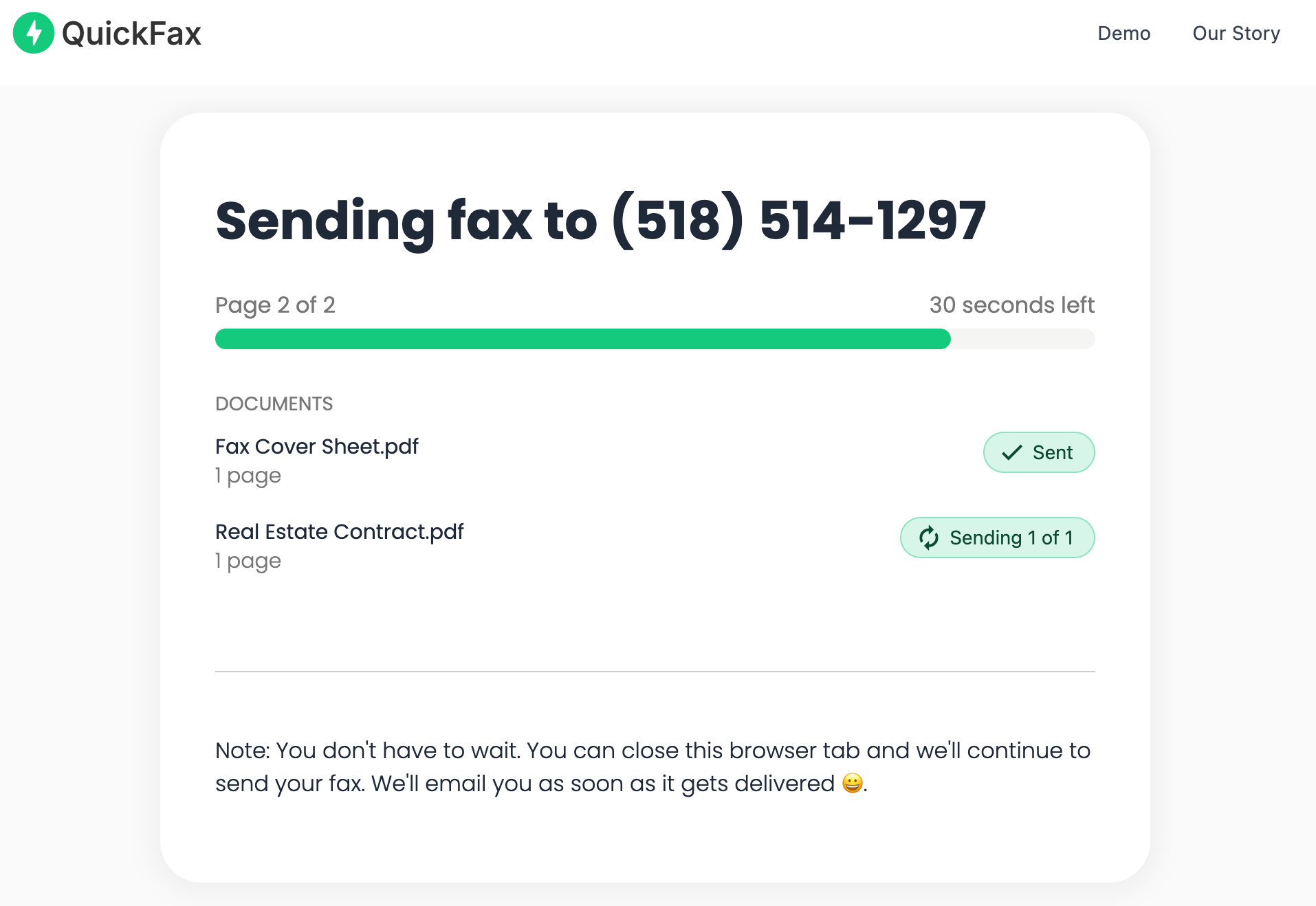
    Send your fax and watch it get delivered

    Track delivery in real time. Once the fax is received, you get an email confirmation. Your files are then automatically deleted from QuickFax's servers.QuickFax live fax sending status page

Need to send a fax right now?

No account to setup. No subscription to pay. $1.50/page.
Send a Fax Online →
Full cost breakdown

What It Actually Costs to Fax Right Now

Per-page prices don't tell the whole story. Here's what a typical 5-page fax actually costs across your main options — factoring in everything you'll actually spend.

OptionPer Page5-Page FaxHours AvailableReal Total Cost
QuickFax Cheapest + fastest$1.50$7.5024/7$7.50No travel. No waiting.
Staples$1.79 (first), $1.59 (add'l)~$8.15Store hours$8.15 + gas + time
FedEx Office$1.89+~$9.45Store hours$9.45 + gas + time
UPS Store$2.00+~$10.00Store hours$10.00 + gas + time
Public Library$0.50–$1.00~$2.50–$5.00Very limitedCheapest — if local fax & library is open

The library is the cheapest option on paper — but availability is unpredictable, hours are limited, and most libraries only support local fax numbers. For anything time-sensitive, it's a gamble. For most people faxing a real document that matters, QuickFax is the fastest and cheapest full-service option.

Honest take

When a Physical Fax Location Still Makes Sense

Not every situation calls for online faxing. Here's when a trip to a physical store might actually be the better call.

If you're already heading to a UPS or FedEx location for another reason — shipping a package, picking up a hold — adding a fax to that errand makes total sense. The per-page cost is comparable, and you're not making a dedicated trip. Similarly, if you only have a physical paper document and no way to photograph or scan it, a store with a fax machine is still a straightforward option.

Public libraries remain the cheapest fax option for local calls during library hours — worth checking if you're in no rush, sending a short document, and the library is close.

For everything else — urgent timelines, phone-only access, after-hours needs, sensitive documents, or anything more than a page or two — online faxing removes every obstacle the physical option creates.

Kind Words from QuickFax Customers

Fast, secure, the price is right! This site is a blessing for those who rarely have to send a fax.

Stephen from California

By far the easiest and most convenient internet fax service I have ever used. Highly recommend.

John from New Mexico

I loved that it doesn't require a subscription or a free trial. I just got in and faxed what I needed to.

Tom from Mississippi

This was my first time sending a fax this way, and it was very easy. I will definitely use this again. Was much easier then going to a store.

Elizabeth from Arizona

Trusted by thousands to fax IRS, SSA, legal, medical, government documents, and more.

Send a Fax Online →

No subscription. $1.50/page.

Common questions

Frequently Asked Questions

Does CVS offer fax services for customers?

No. CVS does not provide public fax services at any of its 9,000+ retail locations. While CVS pharmacies have fax machines, they are used exclusively for internal medical communications — prescription transfers, insurance authorizations, and provider-to-provider communications. Customers cannot use these lines to send personal documents.

Why doesn't CVS offer public faxing?

There are a few reasons. CVS pharmacy fax lines are part of a HIPAA-regulated medical network and legally can't be opened to public use. The fax infrastructure is embedded in pharmacy management software, not a standalone machine. And CVS has strategically moved away from general office services in favor of health-focused offerings. It's not an oversight — it's by design.

Can CVS pharmacy fax a prescription or medical document for me?

CVS pharmacists can fax prescriptions and medical communications as part of their standard healthcare workflow — for example, transferring a prescription to another pharmacy or communicating with a doctor's office. This is a service between healthcare providers, not a customer document service. You can't bring a form to the counter and ask them to fax it for you.

Where can I fax something near a CVS?

Physical options near most CVS locations include UPS Store ($2.00+/page), FedEx Office ($1.89+/page), Staples ($1.79 first page), and some public libraries ($0.50–$1.00/page for local faxes). Or you can skip driving entirely: QuickFax lets you send a fax from computer or phone right now for $1.50/page with no account needed.

Can I fax from my phone without going anywhere?

Yes. QuickFax works in any mobile browser — no app required. You can fax a PDF, a Word document, or even a photo you took with your phone camera (including iPhone HEIC format). Enter the fax number, pay per page, and it's sent. You get live status tracking and an email confirmation when the fax is received.

Is online faxing secure for sensitive documents?

QuickFax uses TLS 1.2 encryption in transit and AES-256 encryption for files at rest. Documents are automatically deleted from QuickFax's servers after delivery or failure — they're never stored longer than necessary. For most people, this is actually more secure than handing a document to a store employee to fax on a shared public machine.

Ready to Send Your Fax?

Just enter the fax number, upload your documents, and send.

Send a Fax Online →
No account needed No subscription $1.50/page Supports photos & PDFs Delivery confirmation Files deleted after faxing
© 2026 QuickFax LLC