Can You Fax at the Library? (2026 Answer + Best Alternative)
Most public libraries do offer fax services — but availability, hours, pricing, and policies vary wildly from branch to branch. Here's what to verify before you make the trip, and what to do if the library won't work for your situation.
No account to setup. No subscription to pay.
The “your library system has fax machines” stat covers the system overall — individual branches may not have one, the machine may be out of service, or faxing may only be available at certain hours. Don't drive across town until you've confirmed it's available today.
Sending faxes is widely supported. Receiving faxes at a library is rare — and only available at a small number of branches. If you need to receive a fax, confirm that capability specifically when you call.
How Common Is Faxing at Public Libraries?
The Public Library Association's 2023 survey found that fax machines remain a common technology service at US public libraries — one of the few physical document services still widely maintained alongside printing and photocopying.
Source: Public Library Association (PLA) Technology Survey, 2023
That's meaningful — the majority of library systems do have the capability. However, you should confirm with your branch before making the trip.
What public libraries typically offer
How to Fax at the Library
Library faxing is typically straightforward once you're there — but the preparation steps matter more than at commercial locations because policies are less standardized.
Ask: “Do you have a fax machine available for customer use?” and “Is it working today?” Equipment downtime is common. Some branches stop accepting fax requests 15–30 minutes before closing.
Some libraries are cash-only. Others have card-only kiosk systems. A few offer faxing free. Don't assume — ask about the specific payment method accepted at your branch.
Library fax machines require physical paper documents. If your files are digital (PDF on your phone, email attachment, photos), you'll need to print them first — either at home or at the library's print station.
Include the country code (1 for US), area code, and full number. Most library staff will enter it for you or supervise, but having it written down prevents transcription errors.
Most library fax services are staff-assisted — you don't operate the machine yourself. Some branches have installed third-party kiosk systems (like FaxScan24) that are self-service, but staff-assisted is more common.
After the fax transmits, ask for a printed confirmation showing the fax number, page count, date/time, and transmission status. Not all systems generate one automatically, and it's your proof of delivery.
Some library systems have installed third-party kiosk systems that are self-service, card-accepting, and available during all library hours. If your branch has one, the experience is more like an ATM than asking a librarian. These typically charge around $1.50–$2.00 per page and accept cards. Ask your library staff if they have one.
Library Fax Costs: Real Examples
Library pricing is some of the most variable in the faxing landscape — ranging from completely free to $3.95+ per page for international faxes. The table below shows documented pricing from real library systems to give you a sense of the range.
| Location | First Page | Additional Pages | International | Notes |
|---|---|---|---|---|
| Saint Paul Public Library (MN) | Free | Free | — | Outbound only; via branch |
| Cincinnati Public Library (OH) | Free (up to limit) | Free | — | Some branches; outbound only |
| St. Louis Public Library (MO) | Free (with card) | Free | — | Library card required |
| Tyler Public Library (TX) | $1.00 | $1.00 | $1.50/page | Local & toll-free $1.00; fax ends 15 min before close |
| Enoch Pratt Free Library (MD) | $1.75 | $1.00 | Higher rate | Outbound only; staff-assisted |
| Lynn Public Library (MA) | $1.00–$1.50 | $0.50–$1.00 | Contact branch | Can receive faxes; cash preferred |
| Lake County Public Library (IN) | $1.00 | $1.00 | Contact branch | Accepts inbound faxes at select branches |
| Seguin Public Library (TX) | $1.50 | $1.50 | — | FaxScan24 kiosk; card-only; self-service |
| International (typical range) | $3.95–$5.99 | $2.00–$3.00 | Standard rate | Where offered; many libraries decline international |
| QuickFax (online) | $1.50 | $1.50 | — | Flat rate · from computer or phone · 24/7 |
Pricing verified through library websites and patron-reported sources. Library rates subject to change — call to confirm before visiting.
Free library faxing sounds ideal — but factor in travel time (20–45 minutes round trip), potential wait time, gas or transit costs, and the risk of a broken machine or closed branch. For a 3-page fax, QuickFax at $4.50 total may cost less than the trip.
Why Library Faxing Has More Friction Than You'd Expect
Libraries are genuinely great for occasional, low-urgency faxing — especially if you're already there and cost is the primary concern. But several structural limitations make libraries a poor fit for time-sensitive situations.
Most libraries are open weekdays until 6–8 PM, with reduced weekend hours. Many close on holidays. If you need to fax an IRS deadline, court document, or medical form after hours, the library won't help. Some even stop accepting fax requests 15–30 minutes before closing.
A fax machine at one branch doesn't mean your nearest branch has one — or that it's working. Post-COVID, many systems have reduced the number of branches with fax machines. The only way to know is to call ahead, every time.
Library fax machines are shared, aging equipment. They jam, run low on paper, and go offline without notice. Unlike commercial locations that have dedicated technicians, a broken library fax machine may stay broken for days or weeks while waiting for service.
Library faxing requires physical paper. If your document is a photo on your phone, a PDF in your email, or a file in cloud storage, you must print it before faxing. That means an extra step at the library's print station — and an extra cost per page.
Library fax machines are public shared equipment. The American Library Association advocates for patron privacy, but your sensitive documents (tax records, medical forms, legal papers) pass through public equipment and may be handled by staff. No encryption, no auto-deletion.
If you need to receive a fax — like getting a signed document back from a doctor or insurer — almost no libraries support this. Inbound faxing is available at very few branches (Lynn Public Library and Lake County, for example), and even then, you must call ahead to confirm.
How Library Fax Policies Actually Vary
One of the most under-discussed aspects of library faxing is how dramatically policies differ — not just between library systems, but between branches in the same system. Here's a snapshot of real-world variability.
| Policy Area | What You Might Encounter |
|---|---|
| Direction | Outbound only (most common) · Both send and receive (rare, select branches only) |
| Payment | Free with library card · Free without card · Cash only · Card only (kiosk) · Cash preferred, cards accepted at some branches |
| Assistance | Staff-assisted at desk (most common) · Self-service kiosk (less common) · Some branches require appointment during busy periods |
| Hours | All library hours (most) · Ends 15–30 min before closing (some) · Appointment only (occasional) |
| International | Not available (many) · Available at extra charge · Available only at main branch |
| Confirmation | Printed confirmation sheet provided (most) · No confirmation (some older machines) · Digital receipt unavailable anywhere |
| Document sensitivity | No restrictions stated · Some branches note ALA privacy guidance applies · No encryption, no auto-deletion on any system |
| Library card requirement | Not required (many) · Required for free tier · Required for any use (some systems) |
Bottom line: library faxing works — but it requires verification at every step. The more time-sensitive your document, the more that variability becomes a liability.
QuickFax: Fax From Your Computer or Phone
QuickFax was built for exactly this situation: you need to fax something, you don't own a fax machine, and you want the simplest possible way to get it done. No subscriptions, no accounts, no driving.
Send faxes at 10 PM, on weekends, on holidays. No library hours, no call-ahead required, no branch-level uncertainty.
Upload PDFs, Word docs, images, or photos taken with your camera. No printing required — your documents go straight from your device to the fax.
Like library faxing, there's no monthly fee and no account setup. Pay $1.50 per page, get it sent, done. No recurring charges.
A real-time status page shows each step of your transmission. Email confirmation when delivered. You'll know it arrived — not just that it sent.
Your documents are encrypted immediately on upload and deleted automatically after successful delivery. Substantially better privacy than shared library equipment.
QuickFax makes it easy to send a one time fax from anywhere, at any time — no special branch required.
Library vs. QuickFax: Full Comparison
| Feature | Public Library | QuickFax |
|---|---|---|
| Availability | Library hours only (typically close by 8 PM) | Winner 24/7 — any time, any day |
| Send faxes | Yes — at branch with working machine | Winner Yes — from any device |
| Mobile-friendly | No — requires printed documents | Winner Yes — phone camera supported |
| Price (domestic) | Free–$1.75/page (varies by branch) | $1.50/page |
| Delivery confirmation | Printed receipt (some branches) | Winner Live tracking + email confirmation |
| Encryption / privacy | None — shared public equipment | Winner 256-bit AES + auto-delete |
| Payment | Varies: cash-only, card-only, or free | Card / major payment methods |
| Account required | Sometimes — library card at some systems | Winner No — pay per use |
| Travel required | Yes — must go to branch in person | Winner No — send from anywhere |
When to Use the Library vs. QuickFax
Library faxing genuinely makes sense in specific circumstances. Here's an honest framework for choosing.
📚Choose the library if…
- →You're already at the library during open hours
- →Cost is your absolute top priority and you have time flexibility
- →You have no smartphone or internet access
- →You've already confirmed your branch has a working machine today
- →You only need to send 1–2 pages and free faxing is available at your branch
✅Use QuickFax if…
- →You need to fax outside library hours (evenings, weekends, holidays)
- →Your documents are digital — PDF on your phone, email attachment, camera photo
- →You need to receive an incoming fax
- →The document is sensitive (medical, legal, financial) and privacy matters
- →You need delivery confirmation you can save as proof
- →You're dealing with a deadline and can't risk equipment downtime
Need to send a fax right now?
No account. No subscription. $1.50/page. Live delivery confirmation.How to Send a Fax Online (in 3 Steps)
With QuickFax you can fax without a fax machine. You don't need to download an app. You don't need to create an account. Here's how QuickFax works.
- 1Go to QuickFax.com on your phone or computer
No app to install. Open the page in any browser — works on iPhone, Android, or desktop.

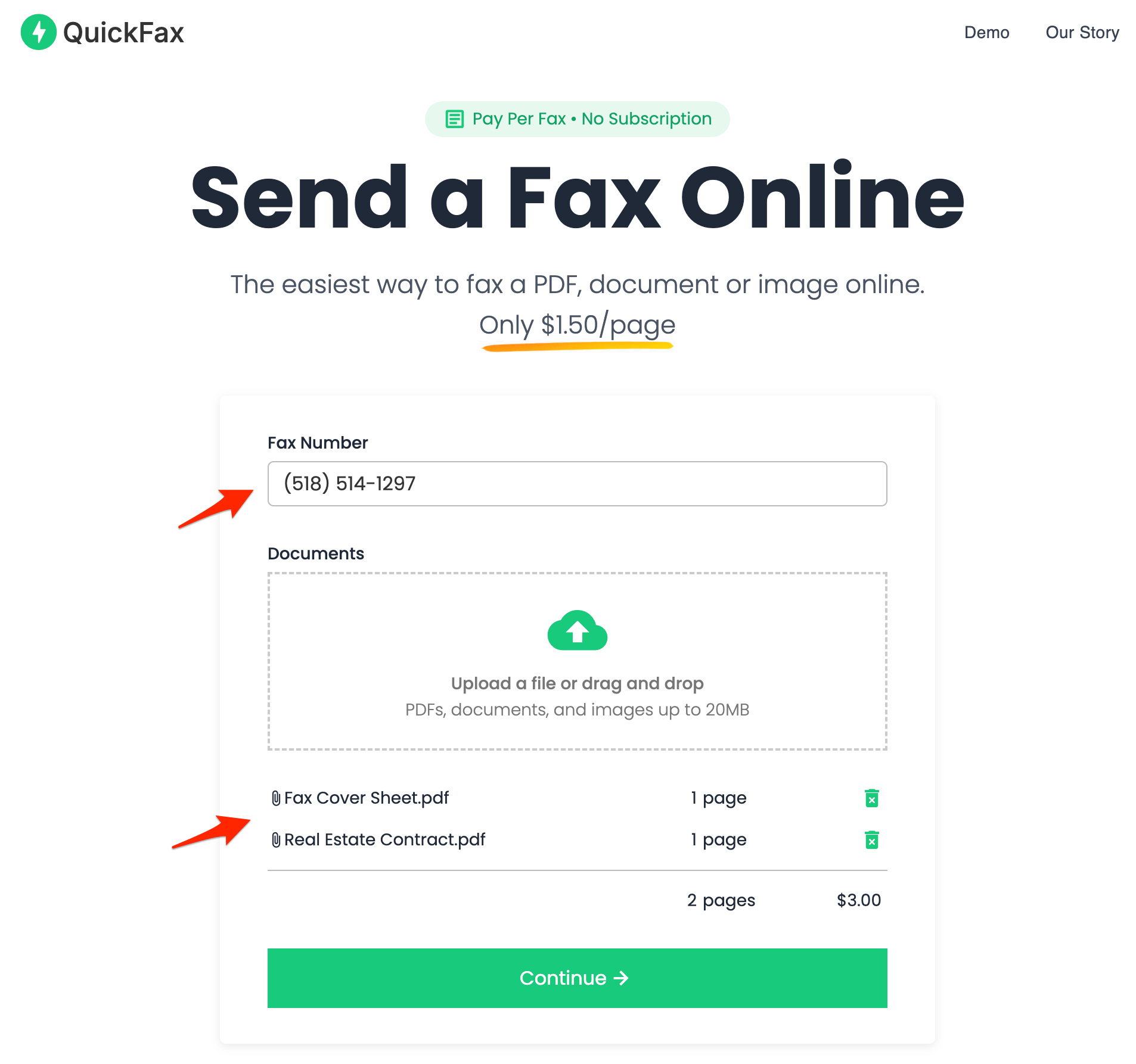
- 2Enter the fax number and upload your documents
You can fax PDFs, Word files (DOC, DOCX), JPG, PNG, and HEIC — including photos taken directly with your phone camera. No conversion needed.
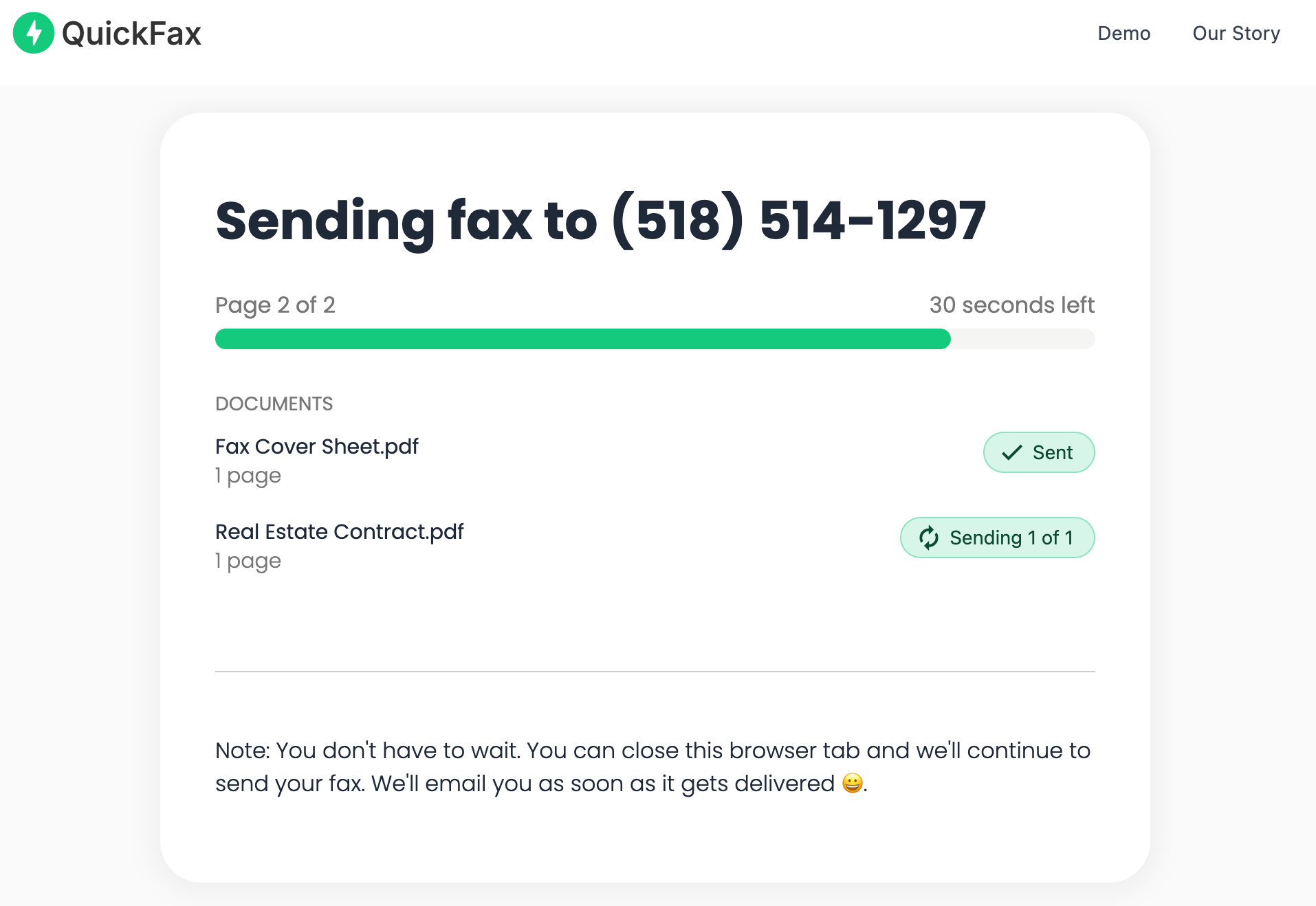
- 3Send your fax and watch it get delivered
Track delivery in real time. Once the fax is received, you get an email confirmation. Your files are then automatically deleted from QuickFax's servers.
Need to send a fax right now?
No account to setup. No subscription to pay. $1.50/page.Other Places to Fax Without a Fax Machine
If your library branch doesn't have faxing available or the timing doesn't work, here are the other physical and online options worth knowing.
UPS Store
Over 5,500 locations nationwide offer staff-assisted faxing. You bring paper documents, staff handle the transmission, and you get a printed receipt. Pricing is not published nationally — community reports range from $2–$3+ per page for domestic faxes, rising significantly for multi-page jobs. Both sending and receiving are available at most locations.
FedEx Office
FedEx Office (formerly Kinko's) at locations with self-service copiers offers faxing. Prices vary by store — representative example pricing from one location: $2.19 to send local, $2.49 domestic. Self-service, not staff-assisted. Not every FedEx Office has fax capability; call ahead.
Staples
Staples stores offer self-service faxing at most locations. Community-reported pricing: approximately $1.79 per page for local faxes, $2.39 for national. Prices are not posted on their website — you pay at the machine or counter after sending.
Subscription online fax services
Services like eFax, HelloFax, and MyFax offer monthly subscriptions starting around $10–$20/month. They make sense for businesses that fax regularly and need dedicated fax numbers and integrations. For occasional use, the subscription model is expensive and the onboarding friction is unnecessary.
Free online fax services
FaxZero and GotFreeFax offer limited free pages with restrictions and ads. Quality and reliability are inconsistent, and the per-page limits are low. They work for very simple, non-urgent situations but aren't suitable for important documents with deadlines.
Why Online Faxing Is More Secure Than a Library Fax Machine
Library fax machines are shared public equipment with no encryption. Your documents pass through hardware used by other patrons, and may be handled by staff. The American Library Association advocates for patron privacy, but shared equipment can't provide true document security.
QuickFax encrypts your files immediately upon upload using 256-bit AES encryption, with TLS 1.2 enforced throughout. Your documents are automatically deleted after successful delivery — or after a failed send attempt. So your fax stays private.
Kind Words from QuickFax Customers
“Fast, secure, the price is right! This site is a blessing for those who rarely have to send a fax.”
Stephen from California
“By far the easiest and most convenient internet fax service I have ever used. Highly recommend.”
John from New Mexico
“I loved that it doesn't require a subscription or a free trial. I just got in and faxed what I needed to.”
Tom from Mississippi
“This was my first time sending a fax this way, and it was very easy. I will definitely use this again. Was much easier then going to a store.”
Elizabeth from Arizona
Trusted by thousands to fax IRS, SSA, legal, medical, government documents, and more.
Send a Fax Online →No subscription. $1.50/page.
Frequently Asked Questions
Can you fax at the library?
Yes — about 78.5% of US public library systems offer fax machines for patron use (PLA 2023 survey). However, individual branches may not have the service, availability varies widely, and most libraries only allow outgoing faxes. Always call your specific branch before making the trip.
How much does it cost to fax at the library?
It varies dramatically. Some libraries offer free faxing (Saint Paul Public Library, some Cincinnati and St. Louis branches). Others charge $0.50–$1.75 for the first page, $0.50–$1.00 for additional pages. Third-party kiosk systems (like FaxScan24) typically charge $1.50–$2.00 per page. International faxes are $3.95+ per page where available. Call your branch for their current rate.
Can you receive a fax at the library?
Receiving faxes at a library is rare. Most libraries only support outgoing faxes. A small number of branches — including some Lynn Public Library and Lake County Public Library locations — can receive incoming faxes. You must call your specific branch to confirm this capability before having a fax sent there.
Are library fax machines self-service or staff-assisted?
Most library fax services are staff-assisted — you bring your documents to the reference or circulation desk and a librarian handles the transmission. Some branches have self-service kiosk systems (like FaxScan24) that let you do it yourself with a card payment. Call ahead to find out which model your branch uses.
Is the library fax machine secure for sensitive documents?
Library fax machines are shared public equipment with no encryption. The American Library Association emphasizes patron privacy, but your documents pass through equipment used by other patrons and may be handled by staff. For sensitive materials — tax records, medical forms, legal documents — an encrypted online service like QuickFax (256-bit AES encryption, auto-deletion after delivery) provides meaningfully stronger privacy.
Can I fax from my phone at the library?
No — library fax machines require physical paper. You must print your documents first. If your files are digital (PDF, photo, email attachment), you'll need to either print them at home before going, or use the library's print station on arrival. QuickFax lets you send a fax from your phone.
What should I do if my library branch doesn't have a fax machine?
Check whether another branch in the same library system offers faxing. If not, the next fastest options are QuickFax (online, from your computer or phone, immediate), UPS Store (staff-assisted, 5,500+ locations), FedEx Office (self-service copier stations at participating locations), or Staples. QuickFax is the only option available outside business hours.
Ready to Send Your Fax?
Just enter the fax number, upload your documents, and send.
Send a Fax Online →